
Feature
AI agent booking: appointments set during the call, in your calendar
Short answer
AI agent booking means an AI answers your phone and books the appointment before the caller hangs up. AIReceptionistGo is 100% AI, and it introduces itself as an AI on every call. It checks the times you offer, puts the appointment in your calendar and sends you a summary.
When your calendar can’t save a booking, it stays pending and the caller is never told it’s confirmed. No more phone tag to settle a time.
Free setup · No contract · Cancel anytime
What it does with a booking call
Booking by phone usually turns into a round of calls back and forth. “Does Tuesday work?” goes to voicemail, the reply comes the next day, and by then Tuesday is gone. Here’s what AI Receptionist does instead, on one call:
Finds out what the caller needs. A cleaning, an estimate visit, a first consultation: the type of appointment decides how long it takes and who does it.
Offers real times. Only the slots that are free in your calendar, within the hours you open for bookings.
Books it and says so. Once the appointment is saved in your calendar, the caller hears the day and time read back.
Handles changes the way you want. A caller who needs to move or cancel is handled by your rules: the request reaches you with the caller’s details, and what happens next is up to you.
Tells you. Every booking or request reaches your inbox in a few lines; the recording and the transcript are in your dashboard.
The calls that aren’t about appointments still get answered. It takes messages, transfers calls the way you’ve set and flags urgent ones, so scheduling is one job among several, not a separate phone line.
Your calendar · This week
Bright Smile Family Dental (example)
- Booked by phone · Thu 10:00 AM · Cleaning · Laura M., existing patient
- Offered, not chosen · Fri 3:00 PM
- Already taken in your calendar
Read back to the caller
“You’re booked for Thursday at 10 a.m.”
How appointment setting works on the call
-
It asks before it offers
A good receptionist doesn’t open the calendar until they know what the visit is for. Neither does the AI. The questions come from your industry’s protocol: a dental office asks if it’s a new or existing patient and what the visit is for; a contractor asks for the address and what needs fixing. Then it knows which kind of slot to look for.
Questions before booking
Phone tag: Depends on who calls back
Online booking link only: The fields on the form
AIReceptionistGo: Your industry’s protocol -
It books into your calendar
You keep the calendar you use today. The AI reads the free time you’ve opened for bookings and saves the appointment there, so you, your team and the AI see the same schedule. Nobody has to copy a note from one place to another.
When the caller gets a time
Phone tag: After one or more callbacks
Online booking link only: Only if they leave the call and go online
AIReceptionistGo: During the call -
If the calendar doesn’t answer, nothing is promised
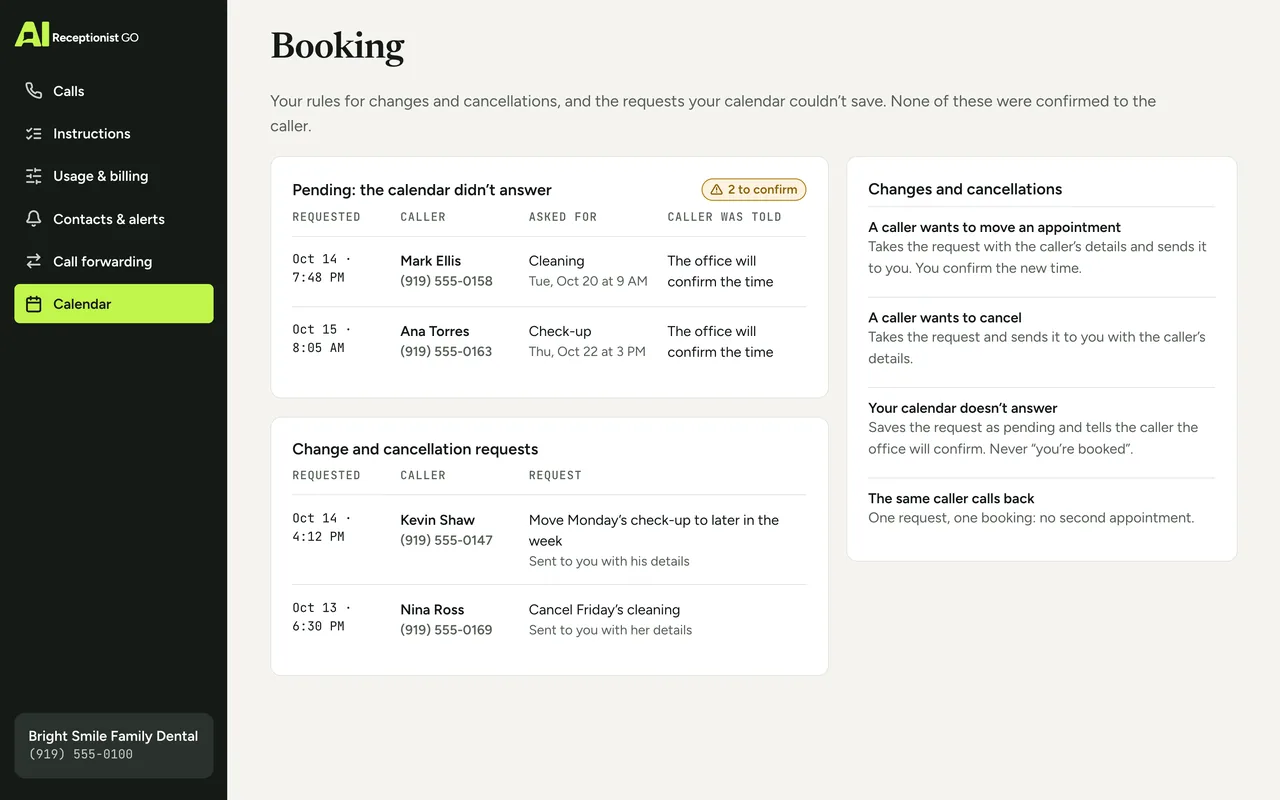
If the booking can’t be saved, because your calendar is down or the slot was taken a second earlier, the AI doesn’t say “you’re booked”. It tells the caller the request is noted and the office will confirm the time, and your summary marks it as pending. One request, one booking: a call that drops and calls back doesn’t end up with two appointments.
If the slot can’t be saved
Phone tag: Someone has to remember
Online booking link only: Error on screen
AIReceptionistGo: Held as pending and flagged to you -
You get the full picture
Each summary tells you who booked, for what and when, and the recording and transcript are in your dashboard if you want to hear exactly what was agreed.
What you receive
Phone tag: Notes and voicemails
Online booking link only: A booking notice
AIReceptionistGo: Summary, recording and transcript
Example call: a cleaning booked on a Thursday
Example call, about 30 seconds. The office and the caller are made up.
Bright Smile Family Dental
Booked
- AI
- Bright Smile Family Dental, you’ve reached AI Receptionist, an AI assistant. How can I help today?
- Caller
- I’d like to book a cleaning.
- AI
- Sure. Are you an existing patient?
- Caller
- Yes. Laura Mendez.
- AI
- Thanks, Laura. I have Thursday at 10 a.m. or Friday at 3 p.m.
- Caller
- Thursday works.
- AI
- You’re booked for Thursday at 10 a.m. What’s the best number for you?
- Caller
- 555-0152.
- AI
- Got it. See you Thursday.
Summary sent to you
- Caller
- Laura Mendez, existing patient, 555-0152.
- Booked
- cleaning, Thursday at 10 a.m. Saved in your calendar.
- Status
- not urgent.
- Done
- time read back to the caller. Friday at 3 p.m. was also offered. No price quoted.
Appointments booked during the call
To hear how a booking sounds, open the AI receptionist demo. Ready now? Get started: your booking rules are set up free of charge.
What you decide about your schedule
An AI scheduling tool is only as good as the rules behind it. You decide them; we configure them to match.
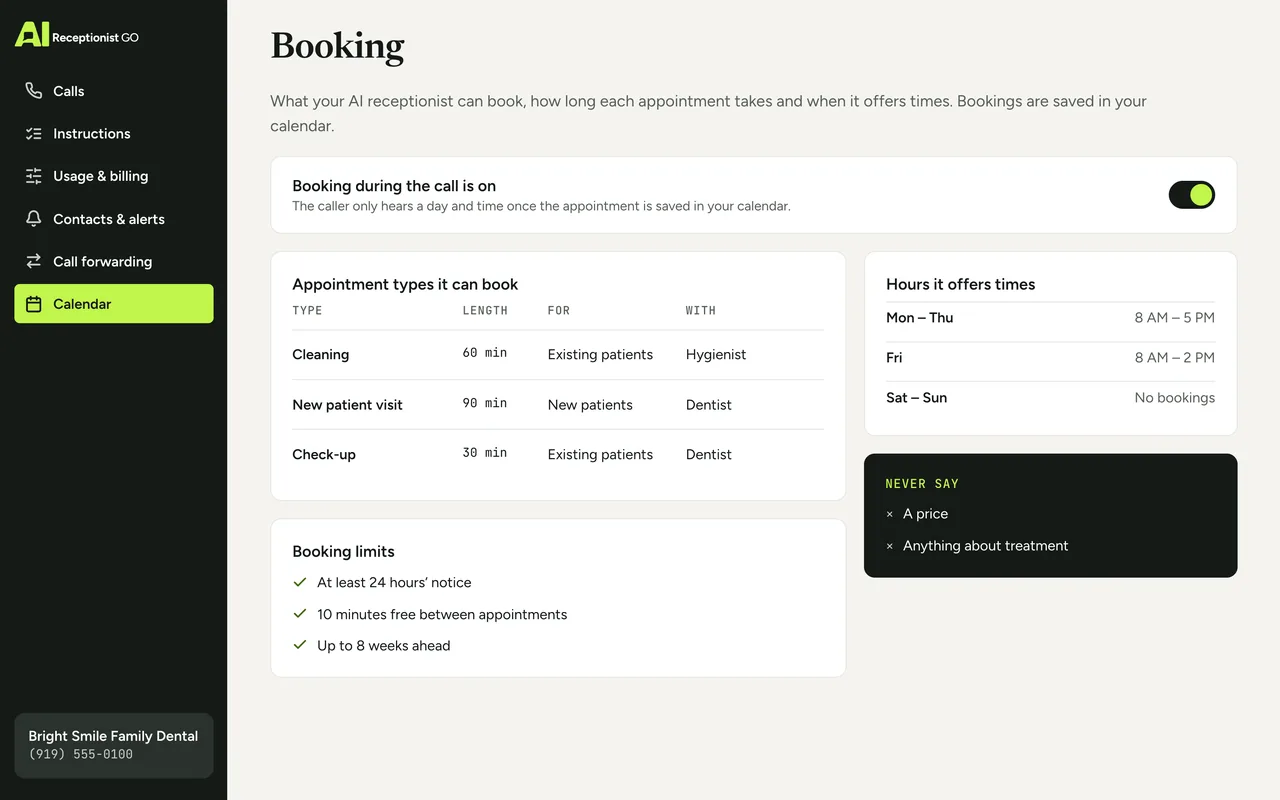
You decide which appointments it can book, how long each one takes and who handles it. You decide the days and hours you open for bookings, how much notice you need and how much room to leave between appointments: travel time for a crew, cleanup time for a chair.
You also set the rule for changes and cancellations: what happens when a caller wants to move or cancel. And you decide what it never says: no prices, no promises about how long a job will take, nothing you haven’t approved.
The method behind each booking
Our call protocols come from nearly two decades of running phone reception for small businesses. We’ve learned that most booking mistakes come from booking too fast, not too slow. Three rules guide every appointment:
-
It asks what matters. What the visit is for comes first, because it decides the length and the person.
-
It never promises what you don’t. No prices, no job-length estimates, no times it hasn’t saved.
-
You see every call. Bookings, changes and pending requests all come with a summary, a recording and a transcript.
Read how a protocol is put together on our method, or follow a call from start to finish on how it works.
Your protocol · Dental Office
ApprovedOn the call above · Bright Smile Family Dental (example)
-
It asks what matters
On this call: Asked first: what the visit is for
-
It knows when to hand over
-
It never promises what you don’t
On this call: No price quoted; the time read back
-
It escalates real emergencies
-
You see every call
On this call: Booking saved, summary sent
Booking by phone compared: phone tag, a booking link and AI
Many automated appointment setups are just a link. That works for customers who prefer to book online. It doesn’t help the ones who pick up the phone, and those are often the people ready to book today.
| Phone tag | Online booking link only | AIReceptionistGo | |
|---|---|---|---|
| When the caller gets a time | After one or more callbacks | Only if they leave the call and go online | During the call |
| Questions before booking | Depends on who calls back | The fields on the form | Your industry’s protocol |
| Callers who’d rather talk | Wait for you | Are sent to a website | Book by talking |
| If the slot can’t be saved | Someone has to remember | Error on screen | Held as pending and flagged to you |
| What you receive | Notes and voicemails | A booking notice | Summary, recording and transcript |
Keep your booking link, too. The AI handles the people who call.
What booking costs
Booking works the same on every plan; what changes is how many calls each one covers. Pay per call with Pay As You Go: no monthly fee, $0.99 for every answered call. Or take calls in a bundle: 50 for $29 a month on the 50-Call Plan, or 100 for $49 on the 100-Call Plan. See every detail on pricing. To see which calendars and tools it works with, check the integrations.
Free setup · No contract · Cancel anytime
Your month, by plan
Best fit: 50-Call Plan, $29.00
- Pay As You Go Best fit $29.70
- 50-Call Plan Best fit $29.00
- 100-Call Plan Best fit $49.00
What the month would cost on each plan: the monthly fee plus each call past the ones included.
Questions about AI appointment booking
What is AI agent booking?
It’s an AI that answers your business phone and books appointments during the call. It asks what the visit is for, offers times that are free in your calendar and saves the appointment there. AIReceptionistGo does this as part of its answering service: appointment scheduling is one of the jobs it handles on every call, with questions written for your industry and a summary of each booking in your inbox.
Can an AI appointment setter book into my existing calendar?
Yes. You keep the calendar you already use, and the AI books into the free time you open for appointments. You, your team and the AI work from the same schedule. During setup we connect it and agree which appointment types, hours and gaps it should respect.
What happens if it can’t save the appointment?
It doesn’t tell the caller they’re booked. It says the request is noted and the office will confirm the time, and your summary flags the call as pending so you can finish it. A caller who hangs up and tries again doesn’t get two appointments: one request means one booking.
Can callers reschedule or cancel by phone?
Yes. A caller can ask to move or cancel an appointment, and your rules decide what happens next. The request always reaches your inbox with the caller’s details and the time they asked for, so nothing changes in your calendar without you knowing.
Does it send automated appointment reminders?
Not before the appointment, no. Reminders keep coming from your calendar, if it already sends them: the appointment lives there like any other, so nothing changes. During the call, AIReceptionistGo confirms the appointment with the caller before hanging up and can text them the confirmation, with your address or a link if they need it.
Is artificial intelligence scheduling only for online bookings?
No. Most AI powered scheduling tools wait for the customer to open a page and fill in a form. AIReceptionistGo answers the phone, holds the conversation and books from there, in English or Spanish, at any hour. It suits the customers who’d rather call, and it works next to any booking page you already have.
What if none of the times offered work for the caller?
It offers the next free slots within the hours you’ve opened. If none of them suit, it takes the caller’s name and number and the times they’d prefer, and sends that to you as a message, so you can call back with an option that isn’t in the open calendar.
Let the phone fill your calendar
Booking is one part of the call. If a new caller needs more than a time slot, see how we handle lead intake and qualification; AI receptionist for small business compares the cost with hiring someone.
Walk us through how you book today: your appointment types, how long they take, the hours you offer and how you handle changes. We turn that into a booking protocol based on how appointments work in your trade. You approve it, switch on call forwarding, and the bookings start landing in your calendar.