
Integrations
Integrations: how the AI receptionist works with your phone, calendar and CRM
Short answer
An AI receptionist is only useful if it fits the way you already work. AIReceptionistGo is a 100% AI receptionist that answers on your existing business number, books into your calendar and sends every call to your inbox, so you don’t have to change phones or learn a new system. Looking for a CRM phone integration? Today every call reaches you as a structured email summary with the caller’s name, number, request and outcome; direct connections to specific CRMs are confirmed case by case before you sign up, never promised. This page lists what connects today and how to ask about the rest.
Free setup · No contract · Cancel anytime
What connects today
These connections are part of every plan. None of them needs new hardware or software on your side.
-
Your business number and phones
- How it connects
- You forward your line to us: always, after hours, or only when you’re busy or don’t pick up. Any line that can forward works, from a cell phone to an office phone system
- What you get
- Callers dial the number they already know; no new phones, no porting
-
Your calendar
- How it connects
- The AI receptionist books into the calendar you already use, following your rules
- What you get
- Appointments land where your team already looks
-
Your email
- How it connects
- A summary of every call goes to the addresses you choose; the recording and transcript are one click away in the dashboard
- What you get
- Every call arrives in the inbox you check anyway
-
Your team’s phones
- How it connects
- Live transfer to any US number you choose: your cell, the office, the person on call
- What you get
- The right call reaches the right person
-
Your callers’ phones
- How it connects
- During the call, it can text the caller a link, your address or a booking confirmation if they need it
- What you get
- Callers leave with the details in writing
-
The call dashboard
- How it connects
- Every call in one place, by date and urgency
- What you get
- One record of everything that came in
How a booking reaches your calendar is explained on appointment scheduling. How forwarding works with your carrier is on call forwarding answering service.
How a call reaches your tools
From the moment a call comes in to the moment the summary lands in your inbox, nobody on your side has to do anything. Here’s the path.
-
The call comes in on your number
Your line forwards it to AIReceptionistGo according to the rules you pick.
-
The AI receptionist follows your protocol
It asks what matters for your industry, books, transfers or takes a message.
-
The result goes where it belongs
A booking goes into your calendar. A transfer goes to the person you named. A message goes into the summary.
-
You get the summary
In the email: who called, what they need, what was done and anything urgent. The recording and the transcript are in the dashboard.
If any step fails, the call doesn’t pretend it worked. If your calendar doesn’t respond, the booking is marked as pending in your summary and the caller is told the office will confirm. One request, one booking, never a “confirmed” appointment that isn’t in your calendar.
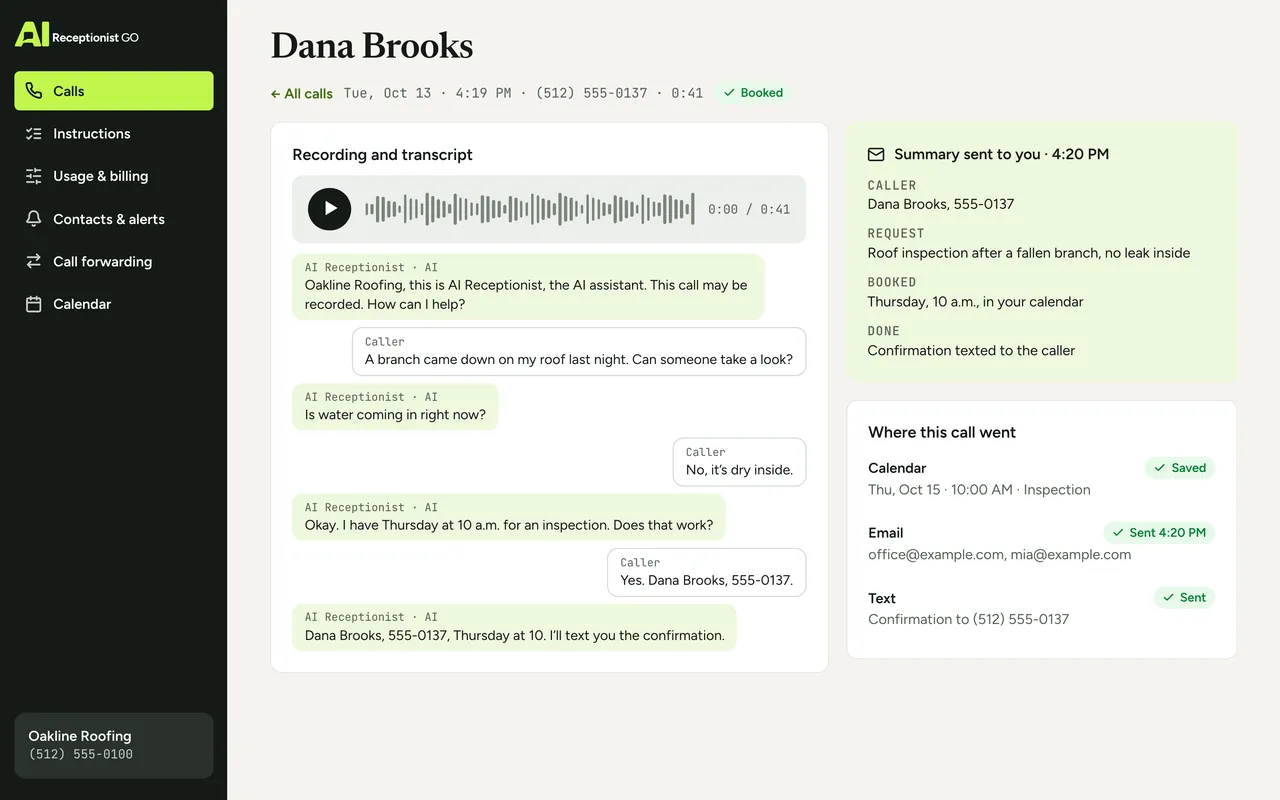
Example: a call that touches three tools
The calendar got the appointment, the caller got a text and you got the summary. Nobody retyped anything.
Example: a call that touches three tools
Oakline Roofing
- AI
- Oakline Roofing, this is AI Receptionist, the AI assistant. How can I help?
- Caller
- A branch came down on my roof last night. Can someone take a look?
- AI
- Is water coming in right now?
- Caller
- No, it’s dry inside.
- AI
- Okay. I have Thursday at 10 a.m. for an inspection. Does that work?
- Caller
- Yes. Dana Brooks, 555-0137.
- AI
- Dana Brooks, 555-0137, Thursday at 10. I’ll text you the confirmation.
Summary sent to you
- Caller
- Dana Brooks, 555-0137
- Request
- roof inspection after a fallen branch, no leak inside
- Booked
- Thursday, 10 a.m., in your calendar
- Done
- confirmation texted to the caller
What about my CRM?
For most small businesses, an AI receptionist CRM integration comes down to one question: will the details of each call end up in the system where you keep your customers? Today, every call reaches you as a structured email summary with the caller’s name, number, request and outcome, plus the recording and transcript in the dashboard. If your CRM can log incoming email, the summary is laid out so the details are easy to file.
Direct connections to specific CRMs, job management software and practice management tools aren’t listed here yet. If your business depends on one, tell us which tool you use before you sign up. We’ll tell you plainly whether it connects and how, and we’ll set it up the way you need if it does. We won’t promise a connection we can’t show you working.
Why you don’t need a call center integration
An answering service CRM integration for a small business is simpler than it sounds. A CRM call center integration usually means software projects: phone menus, agent desktops, screen pops, IT teams. That’s not what a small business needs. You need three things: the call answered properly, the right details captured, and those details in front of you fast. That’s where the work goes.
| Typical call center integration | AIReceptionistGo | |
|---|---|---|
| Setup | IT project, often with a vendor | We set up your protocol; setup is free |
| Phone system | Often replaced or reconfigured | Your number and phones stay as they are |
| Where call details go | Agent desktop and CRM fields | Email summary, dashboard, your calendar |
| Who maintains it | Your IT team | We do, as part of the service |
What you decide
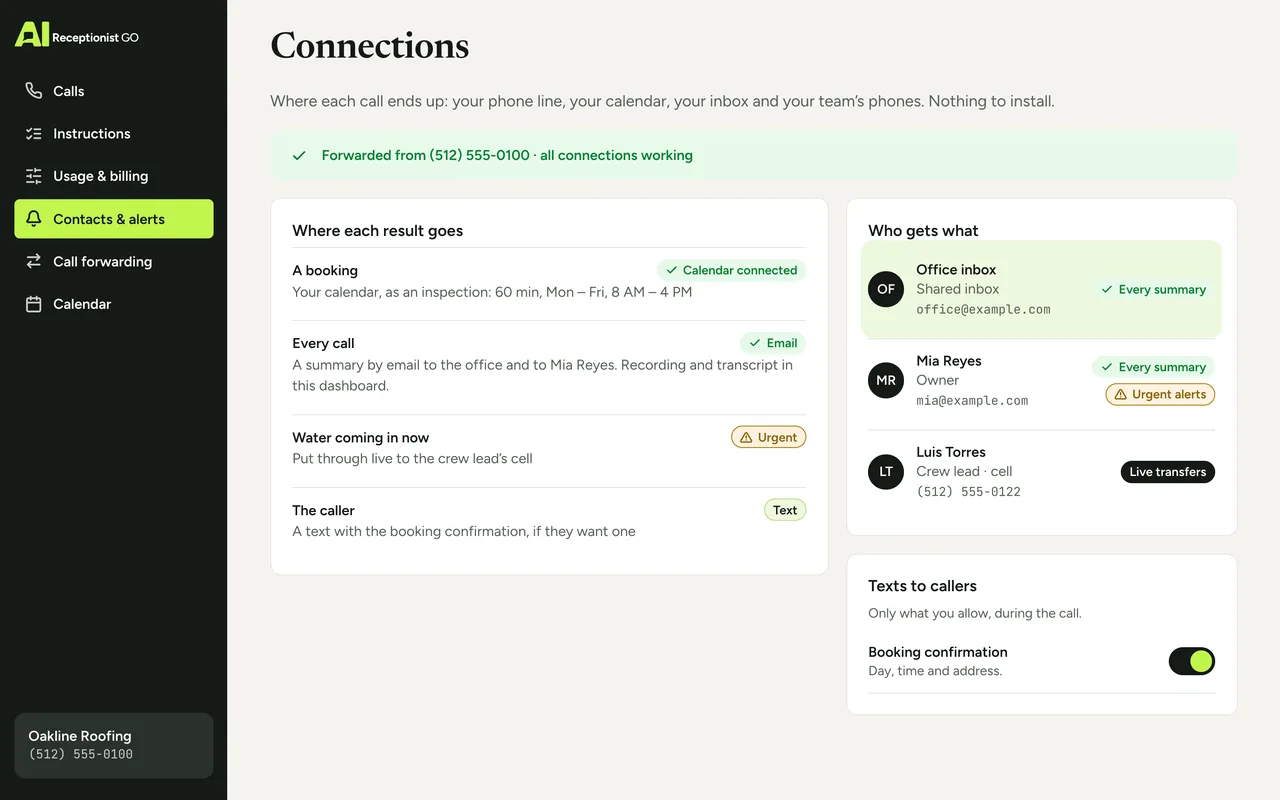
You decide which calls are forwarded and when, which calendar gets bookings and what a booking needs, who receives each summary, which numbers get live transfers and when, and what the AI receptionist may text a caller. We set it up the way you want and you review it before your line goes live. This is the same method we use for every protocol, built on nearly two decades of running phone reception for small businesses: it asks what matters, knows when to hand over and never promises what you don’t.
Price
Every connection on this page is included in every plan. On Pay As You Go there’s no monthly fee and you pay $0.99 per answered call. The 50-Call Plan is $29 a month with 50 calls included. Full details are on pricing.
Questions
Does it work with my phone system?
If your line can forward calls, it works. That covers cell phones, landlines and most office phone systems, including a PBX, as long as it can forward calls. You keep your number and your phones. You choose when calls forward: always, after hours, or only when nobody picks up. We walk you through the forwarding step for your line.
Which calendars can it book into?
It books into the calendar your business already uses. Tell us which calendar you use at signup and we’ll confirm how it connects. If a booking can’t be saved, it’s marked as pending in your summary, never as confirmed. If your calendar can’t be connected yet, the AI receptionist still takes the appointment request with the caller’s details and sends it to you as a pending booking to confirm.
Can call details go straight into my CRM?
Today every call reaches you as an email summary with the caller’s details, request and outcome, plus the recording and transcript in your dashboard. Direct connections to specific CRMs aren’t listed yet. Tell us which one you use and we’ll tell you honestly whether it connects before you sign up.
Do I need new software or hardware?
No. There’s nothing to install. You forward your line, you get summaries by email and you can open any call in the dashboard from a browser. The AI receptionist runs on our side.
What is post-call automation?
It’s what happens automatically after a call ends: the summary goes out, the booking is saved, the caller gets the text they asked for. With AIReceptionistGo that happens on every call without anyone on your team doing it. That’s call automation for a small business: you decide what each type of call should trigger.
Can more than one person get the call summaries?
Summaries go to the addresses you choose. Tell us who should receive what, and we set it up that way. Urgent calls alert the people you name, by email or with a live transfer.
Keep your tools, add the answering
Tell us how you work, which calendar you use and who should hear about which calls. We’ll set up your protocol around the tools you already have, and you review it before your line forwards. Setup is free, there’s no contract and you can cancel anytime. Get started, or read how it works first.