
Feature
AI voicemail: an AI receptionist that answers instead of the beep
Callers who would reach your voicemail get a 100% AI receptionist that asks what they need, checks their number and emails you a summary. When a call would go to voicemail, a 100% AI receptionist answers and asks what the caller needs.
Free setup · No contract · Cancel anytime
Short answer
AI voicemail answers the calls that would otherwise hit your voicemail, and instead of playing a beep it asks the caller what they need. AIReceptionistGo is a 100% AI receptionist: it says it’s an AI, asks the questions your business needs, takes complete details and emails you a summary of every call. Instead of a half-finished message, you get a call you can act on.
What an AI voicemail assistant does instead of the beep
A voicemail box waits. Plenty of callers won’t talk to it: they hang up at the beep and dial the next number in their search results. The ones who do leave a message often forget their number, mumble their name or skip the one detail you needed.
An AI voicemail assistant has the conversation a recording can’t:
-
It answers with your business name. No “the person you are calling is not available”, no full mailbox.
-
It asks what you’d ask. Its questions follow a protocol for your trade, so a caller to a heating company is asked whether the system is completely out and a caller to a law office is asked what the matter is about.
-
It makes sure the basics are there. Who’s calling, a number to reach them and why they called, read back so a wrong digit gets fixed.
-
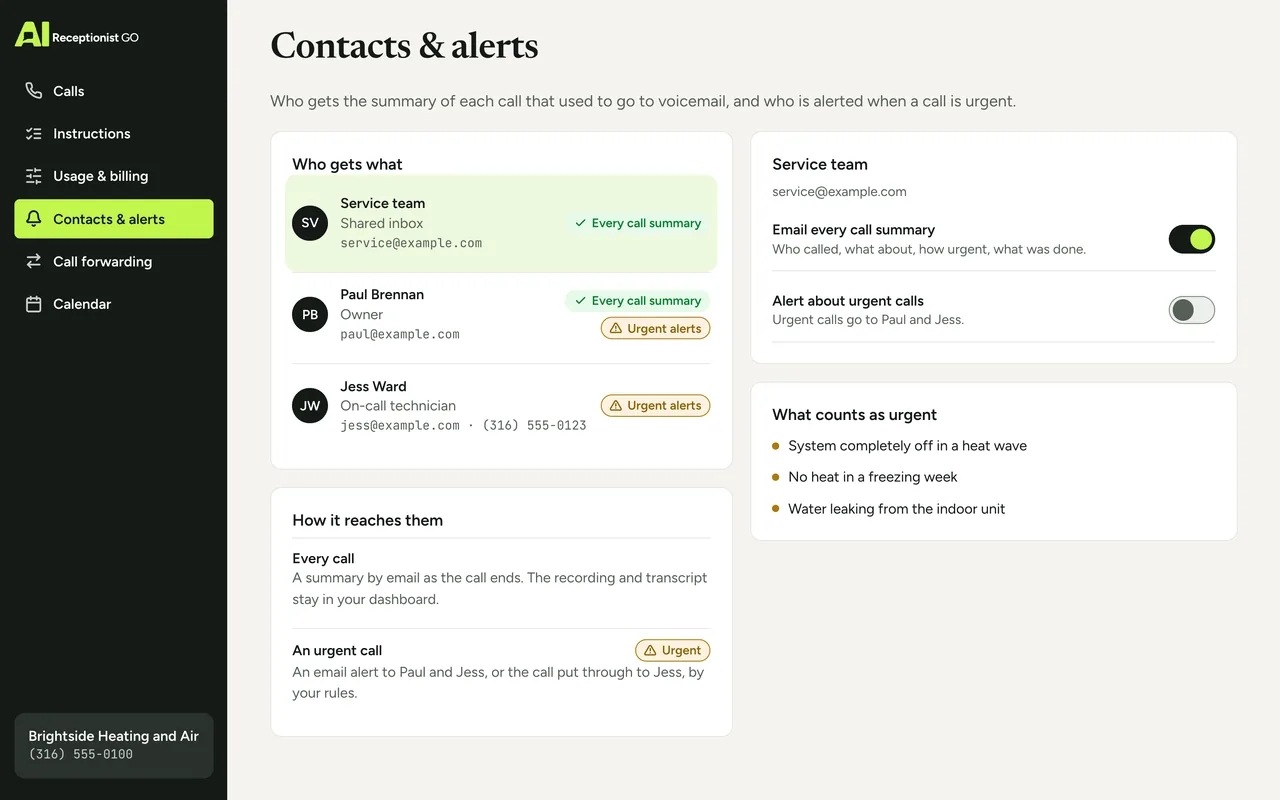
It decides what happens next by your rules. A message for the morning, an urgent alert, or the call passed to you live.
-
It reports. You get a short summary by email; the recording and the transcript are in your dashboard.
How it works when your phone would go to voicemail
-
Your calls stop at the AI, not at the mailbox
When a call automatically goes to voicemail today, it’s usually because nobody picked up, the line was busy or the office was closed. You forward those same calls to AIReceptionistGo and keep your number. All calls, only unanswered ones, or only after hours: see call forwarding for the options.
-
It answers and asks
Your business name comes first, then AI Receptionist saying it’s an AI, in English or Spanish. Then it works through your protocol until it has what you need.
-
It sorts the call
Most calls become a clear message. The ones on your urgent list are flagged and sent on to you or the person you choose. If your rules allow it, callers who just want to leave a message can do that, and still get asked for a callback number.
-
You get the call in writing
A summary lands in your inbox. The full recording and transcript are in your dashboard. More on what a complete message looks like on the message taking service page.
Example call: the customer who was about to leave a voicemail
Brightside Heating and Air
Not urgent
- AI
- You’ve reached Brightside Heating and Air. I’m AI Receptionist, an AI assistant for the company. What can I help you with?
- Caller
- My AC is blowing warm air. I was going to leave a voicemail.
- AI
- I can take it from here. Is the system still running, or completely off?
- Caller
- Still running, just warm.
- AI
- Okay. Your name, address and best number?
- Caller
- Tom Alvarez, 48 Birch Lane, 555-0142.
- AI
- Thanks, Tom. I’m sending this to the team now.
Summary sent to you
- Caller
- Tom Alvarez, 48 Birch Lane, 555-0142.
- Need
- air conditioning blowing warm air.
- Status
- not urgent. System still running.
- Done
- details sent to the team. No visit time or price given.
A real answer instead of the beep
A voicemail might have given you “Hi, it’s Tom, my AC’s acting up, call me.” If you’d rather get the version above, tell us what you’d ask your callers and get started; we build the protocol at no cost. More example calls are on the AI receptionist demo.
Your greeting and your rules
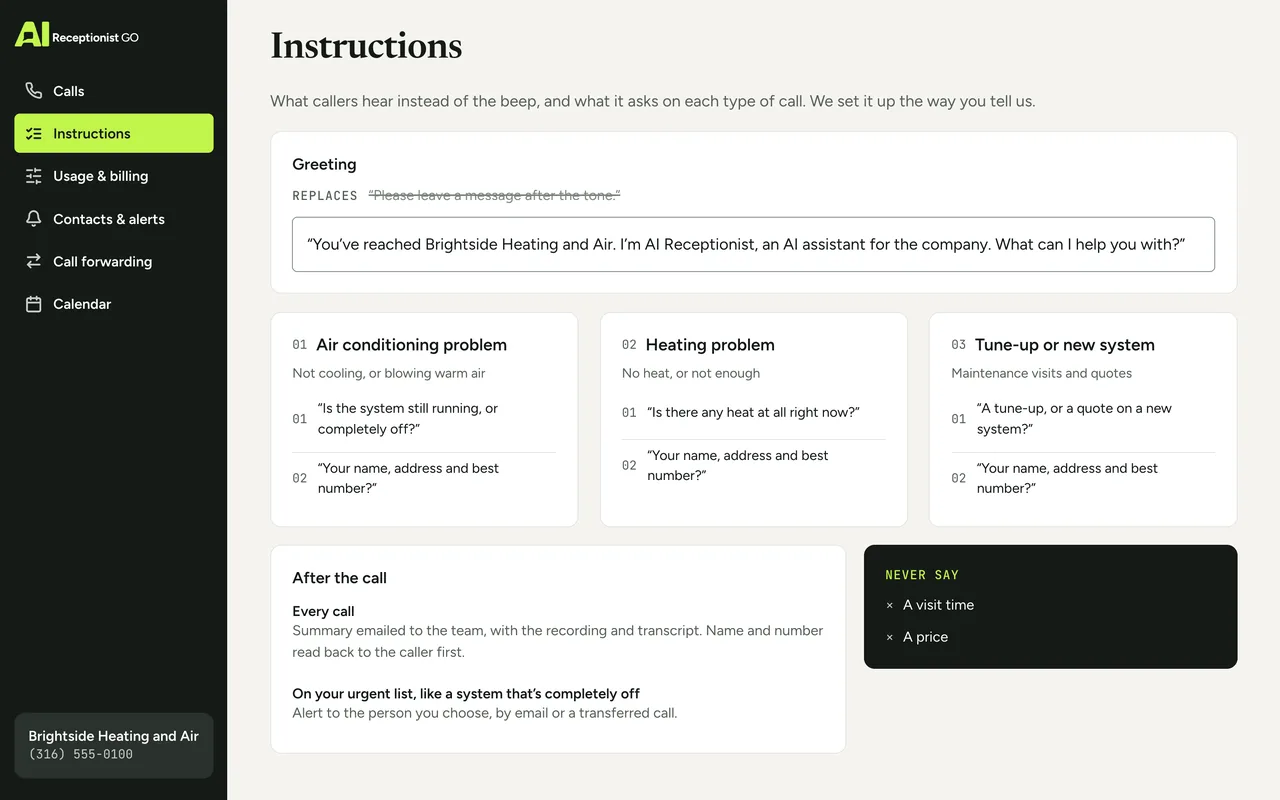
Business phone voicemail greetings are usually one automated voicemail message followed by a beep. With AIReceptionistGo, the greeting is only the first line of a conversation. You decide what the rest sounds like; our team builds it to match.
-
The AI voicemail greeting. Your business name, how it introduces itself, and the first question it asks. How the greeting sounds on the line is on the AI phone assistant page.
-
When it picks up. Every call, only when you don’t answer, when the line is busy, or outside your hours.
-
What it asks. Your questions, call type by call type, in your order.
-
Your urgent list. The situations that can’t wait, and the person alerted by email or handed the call.
-
What it never says. Quotes, technician arrival windows or any commitment you haven’t signed off on.
The method behind each answered call
Our call protocols come from nearly two decades of running phone reception for small businesses. Voicemail can’t ask a follow-up question; a protocol is mostly follow-up questions. Two of our rules matter most for calls that used to hit the mailbox:
-
It asks what matters. Every detail on your must-have list, collected before the caller hangs up, not after you’ve called back twice.
-
It knows when to hand over. Which calls turn into a message, which reach you and which go to your team is your decision.
How we build each protocol is on our method, and the setup, step by step, is on how it works.
Your protocol · Heating & Air
ApprovedOn the call above · Brightside Heating and Air (example)
-
It asks what matters
On this call: Asked: still running, or completely off?
-
It knows when to hand over
On this call: Not urgent → sent to the team, no voicemail
-
It never promises what you don’t
-
It escalates real emergencies
-
You see every call
AI voicemail compared with voicemail and voicemail-to-text
An automated voicemail system, with or without transcription, records whatever the caller decides to say.
| Voicemail | Voicemail-to-text | AIReceptionistGo | |
|---|---|---|---|
| What the caller hears | A greeting and a beep | A greeting and a beep | Your business name and a question |
| Follow-up questions | None | None | The ones in your protocol |
| Missing number or name | You find out when you play it | You find out when you read it | Asked for and read back during the call |
| Urgent calls | Sit in the mailbox until you check | Sit in the inbox until you read them | Flagged and passed on by your rules |
| What you receive | An audio file | A rough text of the message | Summary, recording and full transcript |
If your callers first go through a “press 1 for sales” menu before they reach voicemail, the auto attendant alternative page covers that setup. For nights, weekends and holidays, see the after hours answering service.
What AI voicemail costs
Your voicemail box comes with your phone plan, so here’s what changes. On Pay As You Go, AIReceptionistGo has no monthly fee: you pay $0.99 for each call it answers, which suits a line where only the overflow went to voicemail. Busier lines usually fit the 50-Call Plan, where $29 a month covers 50 calls and each one after that is $0.69. Every plan is on pricing.
Free setup · No contract · Cancel anytime
Your month, by plan
Best fit: 50-Call Plan, $29.00
- Pay As You Go Best fit $29.70
- 50-Call Plan Best fit $29.00
- 100-Call Plan Best fit $49.00
What the month would cost on each plan: the monthly fee plus each call past the ones included.
Questions about AI voicemail
What is AI voicemail?
AI voicemail is an AI that answers the calls your voicemail would have taken. Instead of recording a message after a beep, it talks with the caller, asks the questions your business needs and checks the name and number. With AIReceptionistGo, it also says it’s an AI and sends you a summary of each call, with the recording and the transcript in your dashboard.
What should a business phone voicemail greeting say?
A classic greeting gives your business name, says nobody can take the call and asks for a name, number and reason. The weak spot is the last part: callers skip it. An AI greeting keeps the name and the introduction, then asks for those details one by one, so they don’t depend on the caller remembering them.
Why does my business phone automatically go to voicemail?
Usually because of how your line is set: calls ring a few times and then roll to voicemail, or go there when the line is busy or the office is closed. Those are the same moments you can forward to AIReceptionistGo instead. You keep your number and choose which situations it covers.
Is this the same as voicemail-to-text?
No. Voicemail-to-text writes down whatever the caller said after the beep, gaps included. An AI answering machine like AIReceptionistGo asks questions during the call, so the details are there before the caller hangs up, and it can flag an urgent call or pass it to you instead of leaving it in a mailbox.
What if a caller just wants to leave a message?
That’s fine. If your rules allow it, the caller says what they want to say and AIReceptionistGo writes it down, then asks for a name and callback number if they haven’t given one. You get the message as a summary, and the recording is in your dashboard, so you can still hear it in their own words.
Do I need a new phone or a new number?
No. You keep your number and your phone. You set up call forwarding with your current provider for the calls you want covered, and the rest keep ringing as they do now. The setup steps are on how it works.
Swap the beep for a conversation
Your voicemail greeting took a minute to record. Replacing it takes a short form: tell us what your callers usually need and which calls can’t wait, and we turn that into the questions AI Receptionist asks instead of the beep. You approve the wording, forward the calls that go to voicemail today, and nothing else about your phone changes. Setup costs nothing.