
Feature
Warm transfer: how your AI receptionist puts the right calls through to you
A 100% AI receptionist tells you or your team who’s calling and why, then puts the call through. Calls that don’t need you become messages. Before it puts a call through, a 100% AI receptionist tells you who’s calling and why.
Free setup · No contract · Cancel anytime
Short answer
A warm transfer is when whoever answers the phone tells the person taking the call who’s calling and why, and only then connects them, so the caller never has to explain twice. AIReceptionistGo does this with a 100% AI receptionist. It answers, finds out what the caller needs, checks your rules and puts the call through to you or the right person on your team, already briefed. The calls that need you reach you. The rest become clear messages.
What call transfer does for you
-
It decides which calls go through
A customer with a job in progress, a supplier you’re waiting on, a caller who asks for you by name: your rules say which ones reach a person and which become a message.
-
It picks the right person
Billing questions to the office, site questions to the foreman, new estimates to you. Each person gets the calls that are theirs.
-
It briefs before it connects
The person picking up hears the caller’s name and the reason first, so the conversation starts where it should.
-
It has a plan for no answer
If nobody picks up, the caller isn’t left ringing. The AI takes a full message and the person it was meant for gets an email with the details.
Blind transfer vs warm transfer
There are two ways to pass a call along, and the difference matters to the person on the line.
A blind transfer (also called a cold transfer) sends the call straight to another number with no introduction. Whoever picks up knows nothing about it and asks the caller to start over. If that person doesn’t answer, the call often lands in a voicemail box.
A warm transfer adds one short step. Before connecting, the person who answered tells the colleague taking it who’s on the line and what it’s about. Call centers treat it as the standard for anything that isn’t routine: the caller is expected, not passed around like a ticket.
AIReceptionistGo uses warm transfers, with a briefing of one or two sentences built from what the caller already said.
How a live call transfer works, step by step
-
It answers and asks the reason for the call
AI Receptionist greets the caller in your company’s name, makes clear it’s AI, and moves to the questions in your protocol: who’s calling, what it’s about, whether there’s a job in progress.
-
It checks your transfer rules
Your rules match each kind of call to an outcome: put through to a person, take a message, book a time, or flag as urgent. Hours count too. A call for the foreman at 7 p.m. can become a message for the morning, unless your rules mark it urgent; see how emergency answering decides who gets woken up.
-
It briefs the person, then connects the call
The AI calls the number you chose for that person and tells them who’s waiting and why. Then the two calls are joined. Your team answers knowing the name, the job and the question.
-
If nobody picks up, it takes the message
It tries the next person on your list, if you’ve named one. If nobody is free, it tells the caller, takes the details your protocol needs and sends them by email to the person the call was for. Nothing waits in a voicemail box.
Example call: a contractor asks for the owner
Harbor Roofing
Tue · 9:10 AM
Put through to Mike
- AI
- Harbor Roofing, the crew’s AI assistant answering. What do you need?
- Caller
- Hi, Sam Ortiz from Ortiz Builders. I need Mike about Elm Street.
- AI
- Is it about today’s work on site?
- Caller
- Yes. My crew can’t start until he approves a material change.
- AI
- Understood. I’ll brief Mike and put you through.
- AI, to Mike
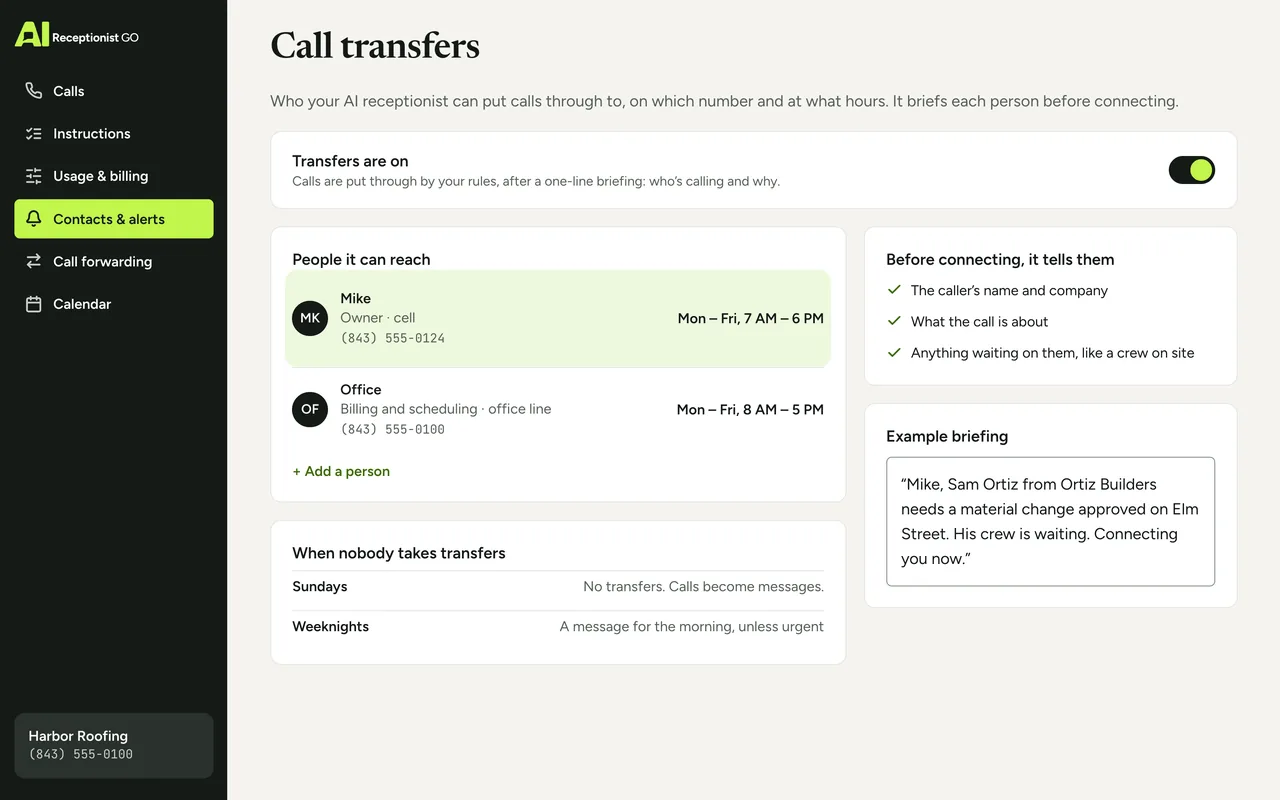
- Mike, Sam Ortiz from Ortiz Builders needs a material change approved on Elm Street. His crew is waiting. Connecting you now.
Summary sent to you
- Caller
- Sam Ortiz, Ortiz Builders, 555-0152 (from caller ID).
- Reason
- needs approval for a material change on the Elm Street job; crew waiting on site.
- Done
- Mike briefed, call put through.
- Recording and transcript
- in your dashboard.
Briefed before the call is put through
Want to pick up already knowing who’s on the line and why? Get started and tell us who takes which calls. Hear how a hand-off sounds on the AI receptionist demo.
What you decide about transfers
You choose who can be reached and when, and we configure the transfers to match.
-
Who’s on the list. You, a partner, the office, a foreman. Each with the number to ring, such as a cell or the office line.
-
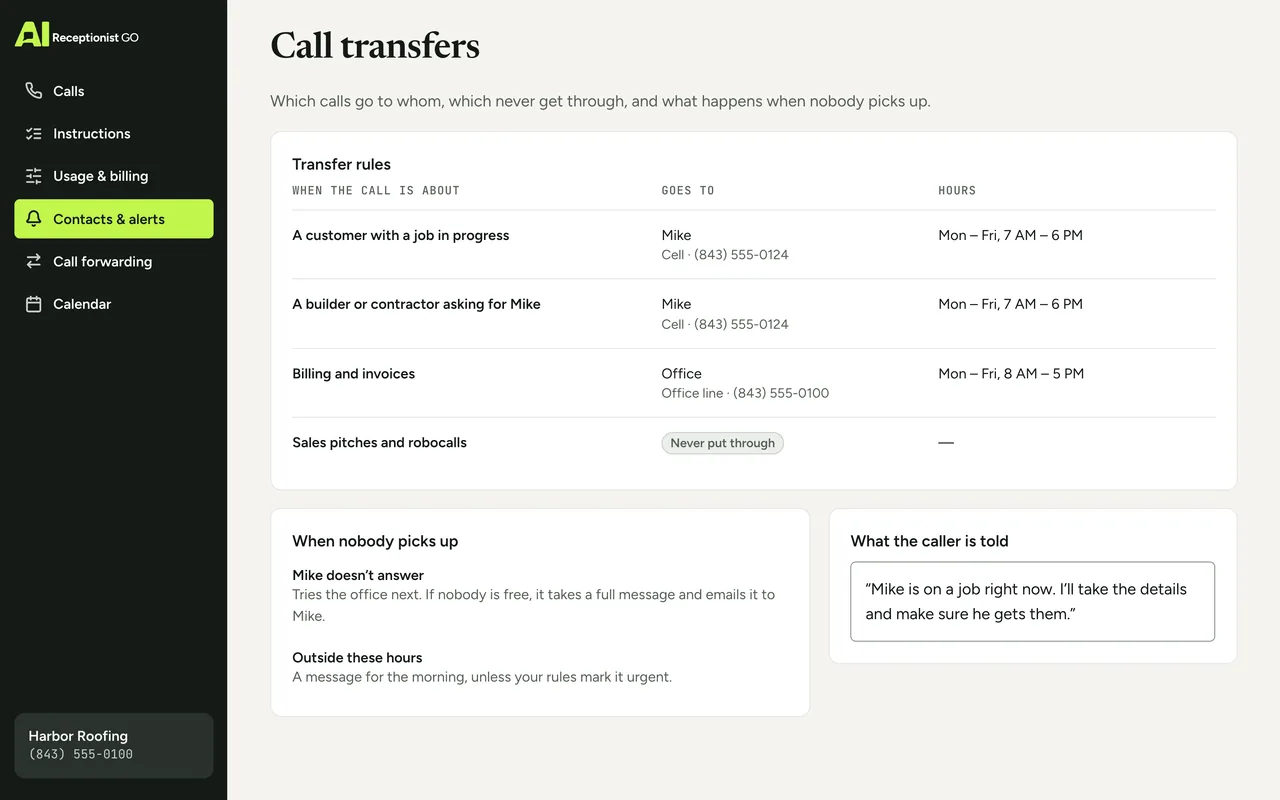
Which calls go to whom. By reason for calling, by customer or by the name the caller asks for.
-
When each person takes calls. Mike from 7 a.m. to 6 p.m. on weekdays, the office during office hours, nobody on Sundays.
-
What happens when nobody answers. A second person to try, or straight to a message with an email to the right person.
-
Who never gets through. Sales pitches and robocalls don’t get transferred; see how call screening sorts them out first.
-
What the caller is told. Your words for “I’m putting you through” and for “he’s on a job right now.”
The method: knowing when to hand over
Our call protocols come from nearly two decades of running phone reception for small businesses.
A transfer is where a receptionist shows whether they understand the business, and three of our rules decide it:
-
It knows when to hand over. A transfer is a decision, not a reflex: your rules say whether a call belongs with you, with someone on your team or in a message.
-
It asks what matters first. The person who picks up gets the name and the reason, so they don’t have to ask again.
-
It never promises what you don’t. It won’t tell a caller “Mike will call you back in ten minutes” unless you’ve said so. It says what it knows: the message is with Mike.
More on the rules behind every call on our method, and the full journey of a call on how it works.
Your protocol · Roofing
ApprovedOn the call above · Harbor Roofing (example)
-
It asks what matters
On this call: Mike briefed first: who’s calling and why
-
It knows when to hand over
On this call: Crew waiting on site → put through to Mike
-
It never promises what you don’t
On this call: No callback time promised
-
It escalates real emergencies
-
You see every call
Virtual switchboard options compared
Most businesses have two ways to get a call to the right person today: a phone menu where callers press 0 for an operator, or a switchboard answering service that passes the call straight through. Some outsourced switchboard teams brief before connecting; many simply pass the call on. Here is how each compares with a warm transfer by AIReceptionistGo.
-
Switchboard service with blind transfer
What the person picking up knows
Nothing
AIReceptionistGo warm transfer
Caller’s name and reason, before connecting
-
Switchboard service with blind transfer
If nobody answers
Voicemail
AIReceptionistGo warm transfer
A full message, emailed to the right person
-
Switchboard service with blind transfer
What you get afterwards
Nothing in writing
AIReceptionistGo warm transfer
Summary, recording and transcript
| Phone menu with “press 0” | Switchboard service with blind transfer | AIReceptionistGo warm transfer | |
|---|---|---|---|
| Who decides where the call goes | The caller, by pressing keys | Whoever answers, on the spot | Your rules, applied to every call |
| What the person picking up knows | Nothing | Nothing | Caller’s name and reason, before connecting |
| Does the caller repeat themselves | Usually | Yes | No |
| If nobody answers | Voicemail | Voicemail | A full message, emailed to the right person |
| What you get afterwards | A missed call | Nothing in writing | Summary, recording and transcript |
| Hours | Any hour; after close, voicemail | The hours you pay for | 24/7 |
| Several callers at once | Yes, in a queue | As many as there are operators | Yes, no queue |
If your callers are stuck in a menu today, see the auto attendant alternative.
What it costs
Every plan answers and transfers your calls the same way, and a transferred call counts as one call: the time after the transfer isn’t charged. You can start with no monthly fee, at $0.99 per answered call. For $29 a month, the 50-Call Plan gives you 50 calls, and each extra call is $0.69. If your phone is busier, the 100-Call Plan covers 100 calls for $49. All the plans are on pricing.
Free setup · No contract · Cancel anytime
Your month, by plan
Best fit: 50-Call Plan, $29.00
- Pay As You Go Best fit $29.70
- 50-Call Plan Best fit $29.00
- 100-Call Plan Best fit $49.00
What the month would cost on each plan: the monthly fee plus each call past the ones included.
Questions about warm transfers
What is a warm transfer call?
A warm transfer call is one where the caller is introduced before being connected: the person taking over hears who’s calling and why, then the call is joined. Nobody repeats their story, and help starts at the first word. AIReceptionistGo does this for every call your rules send to you or to someone on your team.
What happens if I don’t pick up?
You don’t lose the call. If you’ve named a second person, the AI rings them next. If nobody answers, it tells the caller you’re unavailable, takes their name, number and reason, and emails you the details, with the recording and transcript in your dashboard. No voicemail to check, no callback you have to chase.
Will it put through everyone who asks for me by name?
Only if you want it to. Many callers ask for the owner by name, including people selling something. Your rules decide which callers reach you: customers with an open job, for example, but not vendors. Anyone who doesn’t qualify is told you’re unavailable and leaves a message.
Can it transfer calls to my cell phone?
Yes. You choose the number for each person on your transfer list, such as your cell or the office line: any US phone number works, at no extra cost. You also set the hours when each one should ring. Your business number stays the same for your callers, so the number they dial never changes, even when the call ends up on your cell.
What if I’d rather it booked a time than put the call through?
You can set that as the outcome for any kind of call. Instead of ringing you, the AI offers an open slot in your calendar and books it while the caller is on the phone; if your calendar can’t be reached, the booking is left pending for you to confirm. Many owners send estimates to a transfer and routine jobs to a booking. See appointment scheduling.
Can it transfer calls from Spanish-speaking callers?
Yes. It speaks with callers in English or Spanish and applies the same transfer rules in both. If the person on your team who takes the call speaks Spanish, you can route those calls to them. See the bilingual AI receptionist page.
The calls that need you, ready when you answer
Click “Get started” and tell us who’s on your team, which calls each person should take and when. Your transfer rules are built on our protocol for your trade. Once you’ve approved them, point your line our way whenever it suits you. From then on, the calls that need you arrive with the name and the reason already on the line.