
Feature
Automated answering without the “press 1” menu
Callers say what they need in their own words, and a 100% AI receptionist asks what’s missing and emails you a summary. Callers just say what they need. A 100% AI receptionist asks what’s missing and emails you a summary.
Free setup · No contract · Cancel anytime
Short answer
Automated answering is any system that picks up your business calls without a person on the line: a voicemail greeting, a “press 1” phone menu, or an AI that holds a conversation. AIReceptionistGo is the third kind: a 100% AI receptionist that answers your calls and asks callers what they need, instead of making them press 1, 2 or 3. Callers explain in their own words, it asks what’s missing for your type of business, and you get a summary of every call.
What an IVR and an auto attendant are
IVR stands for Interactive Voice Response. An IVR system is a phone system that plays recorded prompts and lets callers choose options by pressing keys or saying short words. Large companies use it to route calls and to handle simple tasks, like checking a balance, without a person.
An auto attendant is the simplest kind of phone menu. It plays a greeting (“Press 1 for sales, press 2 for service”) and sends the call to an extension, a department or a voicemail box. Many business phone plans include one.
In everyday use, people say “IVR” and “auto attendant” for the same thing: the recorded menu a caller has to get through before anything happens. From the caller’s side, both work the same way: they have to fit their reason for calling into one of your options.
Why callers hang up on a phone menu
A menu works when every caller knows which box they belong in. Small business calls are rarely like that.
-
Their reason isn’t on the list
“I got a letter about my lease and I’m not sure who handles that” has no number.
AIReceptionistGo
Caller explains, it asks what’s missing
-
They have two reasons
A menu can send a call to one place. A caller with a repair and a billing question has to pick one, or call twice.
AIReceptionistGo
Both noted in the summary
-
The option ends in voicemail
After three menus, the caller reaches a beep. Some leave no message at all and call the next business on the list.
AIReceptionistGo
Answered and summarized, 24/7
It isn’t a badly set up menu. It’s the format: a menu only offers the options someone recorded months ago.
What automated answering looks like with AIReceptionistGo
-
A question instead of a menu
Your business name comes first, and AI Receptionist says it’s the AI assistant. Then it asks how it can help. That’s the whole “menu”. More on how it listens and handles unclear answers on the AI phone agent page.
-
Every reason for calling is handled
You tell us the kinds of calls you get. Each one has its own questions in your protocol, so a repair request is asked about the problem and the address, and a billing question is asked about the account. If the caller has two reasons, both are noted.
-
The right people get the right calls
Instead of an extension for each button, you have rules: this kind of call goes to you, that kind to your team, the rest become messages. What counts as urgent is also your call, and you choose who’s alerted.
-
A summary instead of a voicemail box
No more mailbox to dig through. After each call you get the recording, the transcript and a short written summary: who called, what about, how urgent, and what the caller was told.
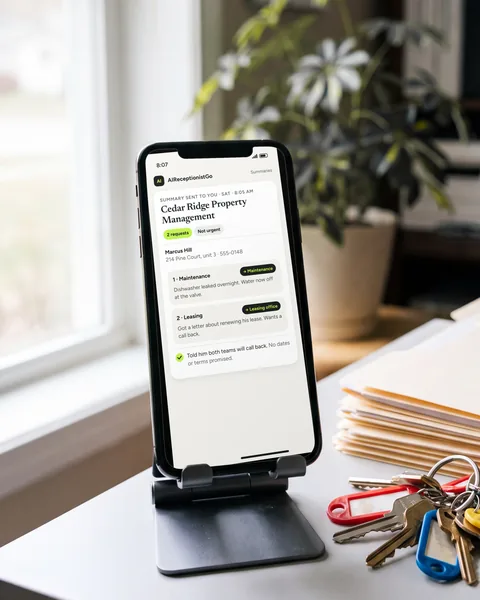
Example call: two reasons in one call
Fictional call, about 30 seconds.
Cedar Ridge Property Management
Sat · 8:05 AM
2 requests
- AI
- Cedar Ridge Property Management, AI Receptionist speaking, the office’s AI assistant. What can I help with?
- Caller
- My dishwasher leaked last night, and I got a letter about renewing my lease.
- AI
- I’ll note both. Is water still leaking?
- Caller
- No, I turned the valve off.
- AI
- Your unit address, name and a good number?
- Caller
- 214 Pine Court, unit 3. Marcus Hill, 555-0148.
- AI
- Thanks, Marcus. Maintenance and the leasing office will both call you back.
Summary sent to you
- Caller
- Marcus Hill, 214 Pine Court, unit 3, 555-0148.
- Request 1, maintenance
- dishwasher leaked overnight. Water now off at the valve. Not urgent under your rules.
- Request 2, leasing
- received a letter about renewing his lease. Leasing office to call him back.
- Done
- told him both teams will call back. No dates or terms promised.
Callers just say what they need
Curious how other calls sound? The AI receptionist demo page has more examples. Or get started and we’ll turn your call types into a protocol, for free.
What you set up instead of menu options
Instead of recording options, you describe how your business works and the protocol does the sorting. All of it is your decision, and we build the protocol around it.
-
Your call types. Repairs, new customers, billing, appointments: whatever your callers actually ask about.
-
The questions for each one. In your order, and the facts that must be collected before the call ends.
-
Who gets what. Which calls come to you, to your team or become a message.
-
What’s urgent. What counts as an emergency for your business, and who’s alerted.
-
What it never says. Prices, dates and advice stay off the table until you’ve approved them.
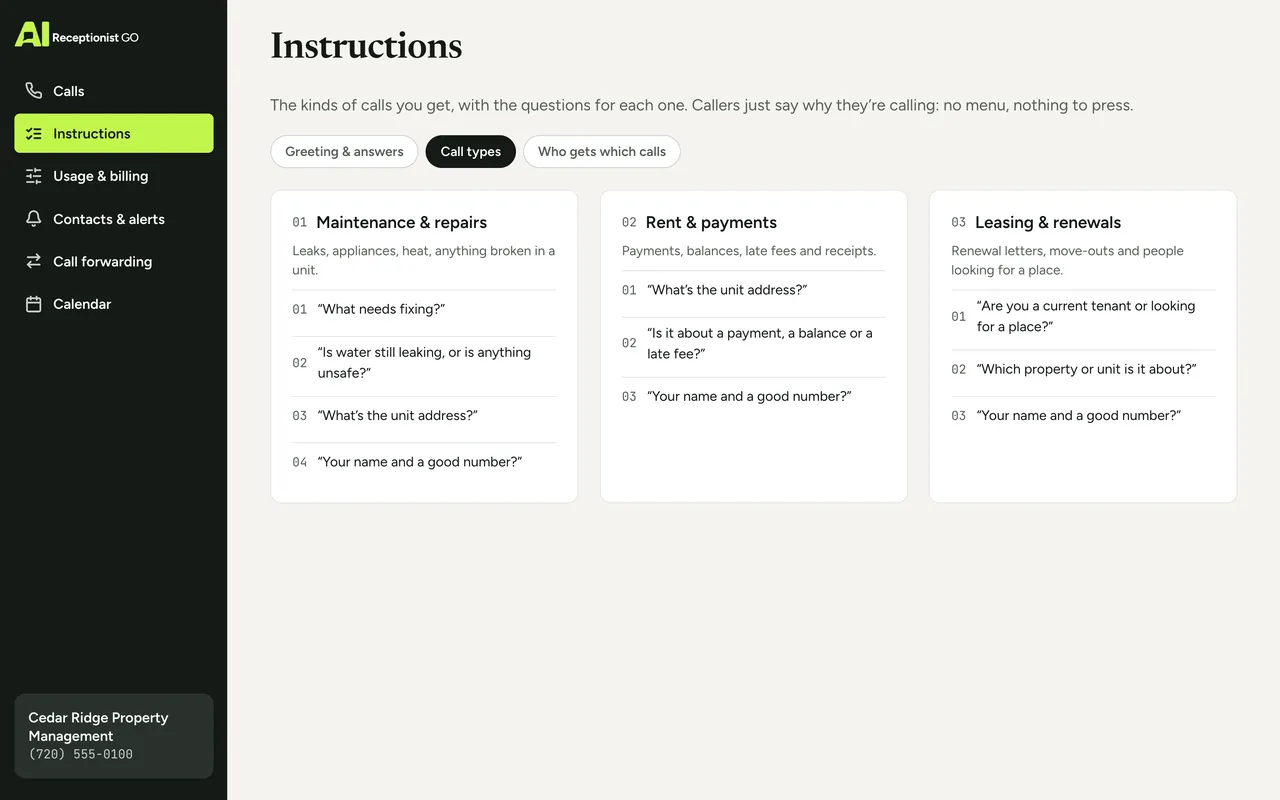
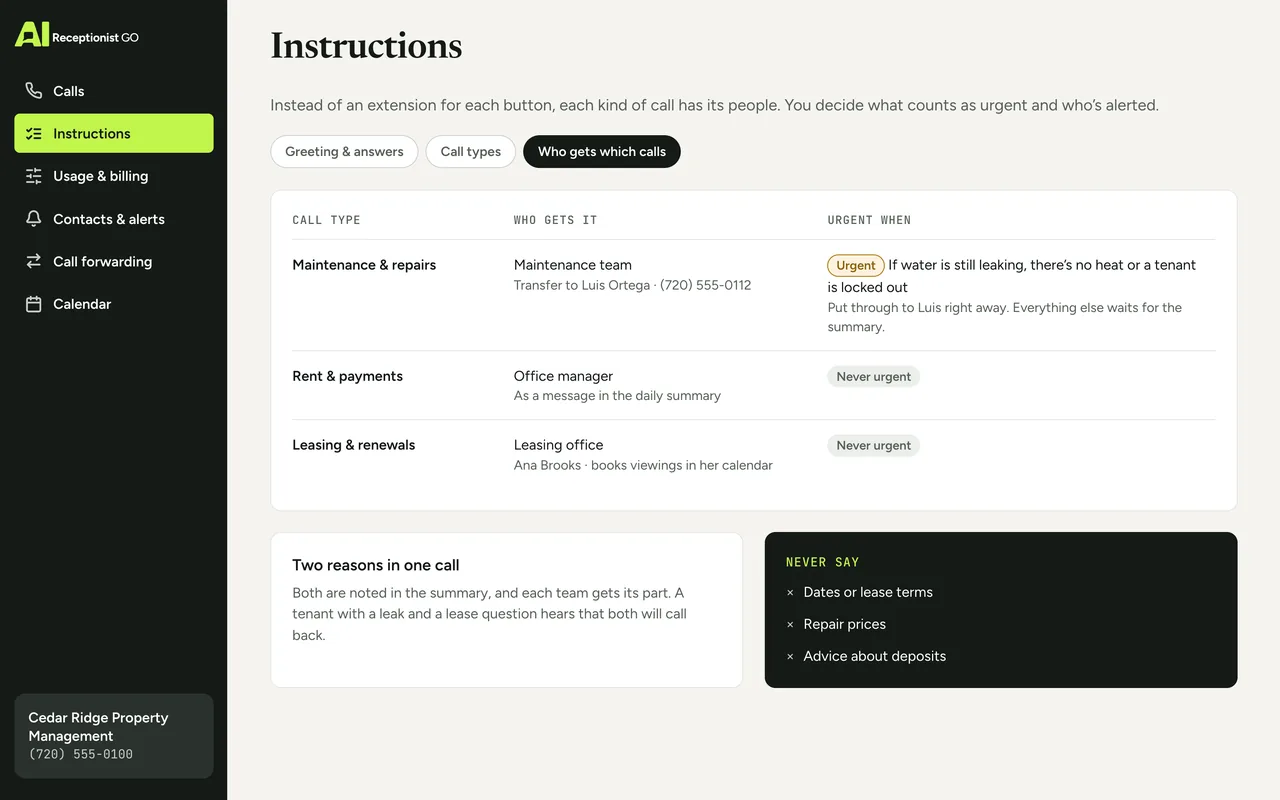
The method behind the protocol
A menu sorts calls by the button pressed. A protocol sorts them by what the caller says. Our call protocols come from nearly two decades of running phone reception for small businesses. These three rules do the work a menu can’t:
-
It asks what matters
Each kind of call has its own questions, so nothing has to be chased down later.
-
It knows when to hand over
No extensions to guess: your rules send each call to you, to your team or to a message.
-
It escalates real emergencies
You decide what’s urgent and who’s alerted, so a leak doesn’t sit in a voicemail box until Monday.
Forwarding your line and the first summary are covered on how it works; the thinking behind every protocol, on our method.
Your protocol · Property Management
ApprovedOn the call above · Cedar Ridge Property Management (example)
-
It asks what matters
On this call: Asked: is water still leaking?
-
It knows when to hand over
On this call: Two requests → maintenance and leasing
-
It never promises what you don’t
-
It escalates real emergencies
On this call: Valve off, so not urgent under your rules
-
You see every call
Automated attendant phone system vs. an AI receptionist
A menu is the right tool for some businesses: many departments, callers who already know where they’re going, or an IVR call center where each call ends in an automatic task. In those cases a phone system IVR earns its place. For a small business where every call could be a new customer, here’s how the two compare.
| Phone menu (IVR or auto attendant) | AIReceptionistGo | |
|---|---|---|
| First thing the caller hears | A list of options | Your business name and “How can I help?” |
| Reason not on the list | Caller guesses or hangs up | Caller explains, it asks what’s missing |
| Two reasons in one call | One option, one destination | Both noted in the summary |
| Nobody available | Usually voicemail | Answered and summarized, 24/7 |
| Spanish | A separate recorded menu (“press 2”) | Same protocol, in Spanish (bilingual AI receptionist) |
| What you receive | Voicemails, if callers leave one | Summary, recording and transcript |
| Changing it | Re-record and reprogram options | You say what changed; we update your protocol |
If you’re comparing an AI with a remote receptionist service staffed by people, see virtual receptionist.
What it costs
A basic auto attendant often comes with your phone plan. AIReceptionistGo has no monthly fee to start, at $0.99 per answered call, and answers around the clock in English and Spanish on every plan. With the 50-Call Plan, $29 a month covers 50 calls; past that, each call is $0.69. The rest of the plans are on pricing.
Free setup · No contract · Cancel anytime
Your month, by plan
Best fit: 50-Call Plan, $29.00
- Pay As You Go Best fit $29.70
- 50-Call Plan Best fit $29.00
- 100-Call Plan Best fit $49.00
What the month would cost on each plan: the monthly fee plus each call past the ones included.
Questions about automated answering and IVR
What does IVR stand for?
IVR stands for Interactive Voice Response. It’s a phone system that answers calls with recorded prompts and lets callers choose options with their keypad or with short spoken answers. That’s the full form of the IVR acronym, though most callers just call it “the phone menu”.
What’s the difference between an auto attendant and an IVR?
An auto attendant is a recorded menu that sends calls to an extension or department. An IVR can do that and also handle simple automatic tasks, like reading out a balance. Many people use the two terms for the same thing. Neither one holds a conversation or asks follow-up questions.
Is an automated answering service the same as an AI receptionist?
Not always. Many automated answering services are phone menus with a recorded greeting. An AI receptionist like AIReceptionistGo talks with the caller instead: it asks what they need, works through the questions your industry calls for and writes up each call for you.
Can I keep my current phone system and number?
Yes. Your number and your phones stay as they are; you just forward calls to us. You can forward every call, only after hours, or only when nobody picks up, and switch between those later. The options are on call forwarding.
What if a caller just wants to talk to a person?
You decide what happens. If your rules say a call like that comes to you or your team, that’s where it goes; if not, it becomes a message with the caller’s name, number and reason. Either way, nobody is stuck pressing 0 and waiting, and you see the details in your summary.
Why pay for this if my phone menu is free?
Because the cost of a menu is the calls it loses, not the monthly fee. If your callers usually have a clear reason and press the right button, a menu may be enough. If they hang up, leave no message or call about two things at once, a conversation catches what a menu drops.
Every call answered, no menu
“Get started” asks you a few questions about your business and the calls you get. We turn your call types into a protocol, you go through it, and your callers stop pressing buttons once you’ve approved it and forwarded your line.