
Use case
Virtual receptionist: an AI front desk for your business phone
A 100% AI receptionist answers every call with your business name, asks the questions you’d ask and sends you the details, day or night. A 100% AI receptionist answers with your business name and passes the details on to you.
Free setup · No contract · Cancel anytime
Short answer
A virtual receptionist answers your business calls from outside your office, finds out what each caller needs and passes the details on to you. AIReceptionistGo is a virtual receptionist that’s 100% AI, and it says so on every call. It answers every call 24/7, in English and Spanish, and works from a call protocol written for your industry. You get the front desk without paying for a person to sit at it, and a summary of every call in your inbox.

The front desk nobody is sitting at
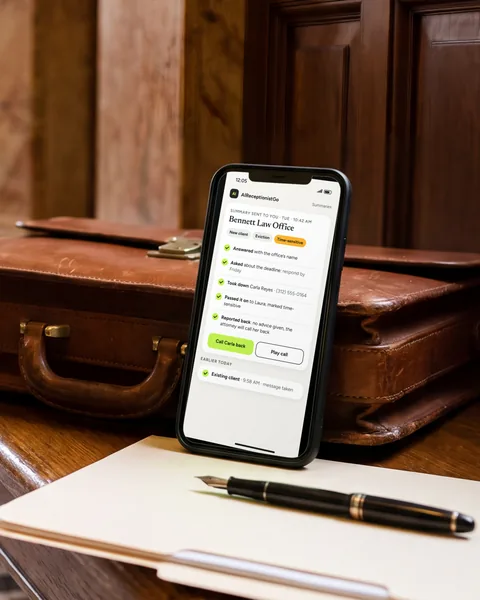
It’s Tuesday, 10:40 a.m. Laura Bennett runs a two-person law office (a fictional example). She’s in court with her phone turned off, and her assistant is out for the day. The office phone rings. It’s a new client with a landlord problem and a deadline on Friday.
Without anyone at the front desk, that call goes to voicemail. If the caller doesn’t leave a message, Laura never knows the call happened, and the client calls the next office on the list.
With a virtual receptionist on the line, the call is answered with the office’s name. The caller is asked the questions Laura would ask. When she walks out of court, the details are already in her inbox, marked as time-sensitive.
That’s the job a receptionist does: no call goes unanswered, nobody gets a promise you didn’t make, and you know what happened without having been there.
What a virtual receptionist does today
For years, a virtual receptionist service meant a team of people in a call center answering for many businesses at once. A remote receptionist does the same work from home. Today there’s a third option: an AI virtual receptionist that answers every call itself.
Whichever kind you choose, the job is the same:
Answer every call with your business name, not a recording.
Ask the questions that tell you what the call is about and how urgent it is.
Take down the details: name, callback number, address or case type.
Pass it on to the right person, by your rules.
Report back, so you know what happened on every call.
A front desk AI does all of this on every call, day and night, with no hold queue, and it can take several calls at the same time. What round-the-clock coverage means at busy times is on 24/7 answering service; how it talks and understands callers is on AI phone assistant.
How it works on your line
-
It picks up right away.
The caller hears your business name and AI Receptionist introducing itself as the AI assistant. There’s no menu of numbers to press.
-
It asks what matters for your business.
A law office asks about the type of case and any deadline; a plumber asks if water is still running. The questions come from the intake routine of your trade.
-
It follows your rules for passing calls on.
You decide which calls come to you, which go to your team and which become a message.
-
You get the summary.
Who called, what they need, how urgent it is and what was done. The recording and the transcript are in your dashboard.
The full walk-through, from setup to the first summary, is on how it works.
Example call: Bennett Law Office
A fictional call to Laura’s office, about 30 seconds long, following a legal intake protocol.
Bennett Law Office · New client · Eviction
Tue · 10:40 AM
Time-sensitive
- AI
- Bennett Law Office, this is AI Receptionist, the AI assistant. How can I help?
- Caller
- I’m a new client. My landlord is trying to evict me.
- AI
- I’ll take your details for the attorney. Is there a deadline?
- Caller
- I have to respond by Friday.
- AI
- Can I have your name and a callback number?
- Caller
- Carla Reyes, 312-555-0164.
- AI
- Thanks, Carla. I’ve marked this as time-sensitive. The attorney will call you back.
Summary sent to you · Tue · 10:42 AM
- Caller
- Carla Reyes · (312) 555-0164
- Needs
- Eviction notice from her landlord. Response due Friday.
- Done
- Took the details. No advice given. Told her the attorney will call back.
A front desk for your business phone
Want this on your office line?
or browse more example calls in the AI receptionist demo.
Free setup · No contract · Cancel anytime
What you decide for your front desk
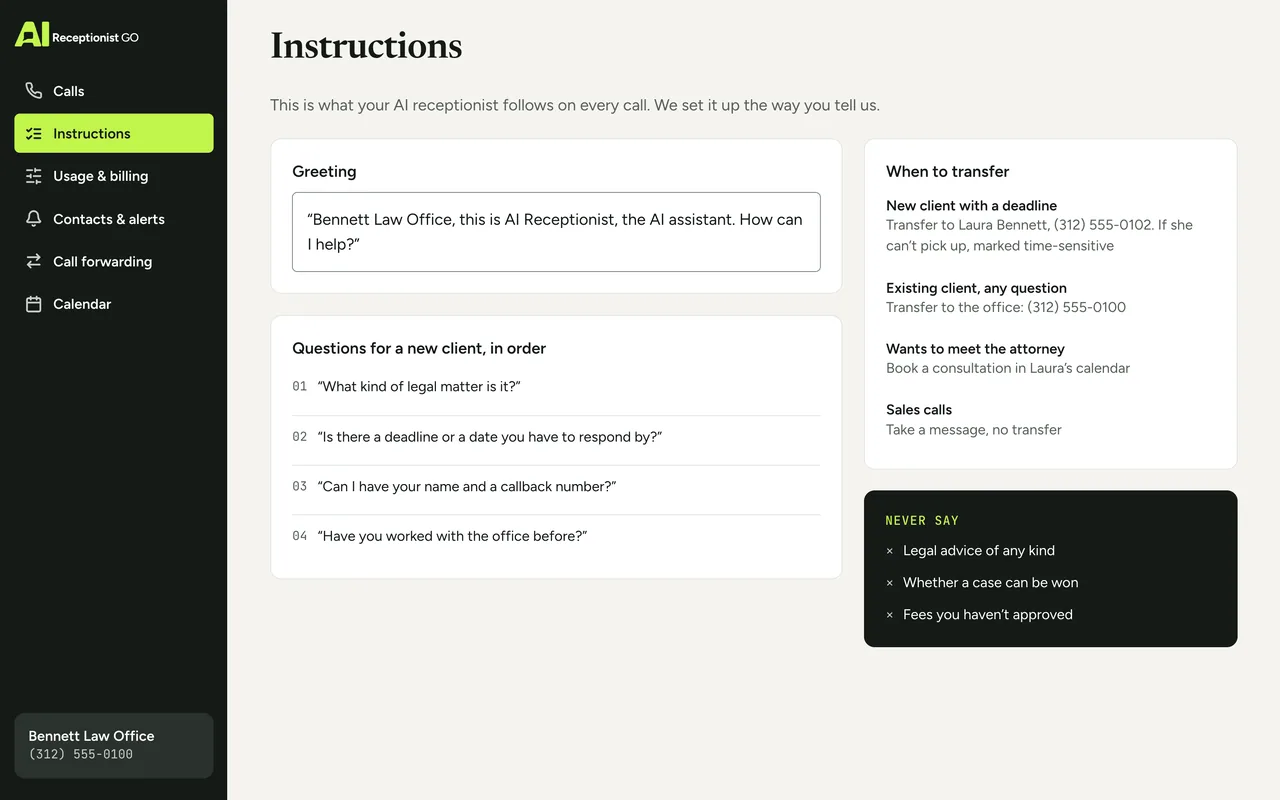
A good receptionist works the way you work. You decide, and we build it that way:
-
Hours
All day, outside office hours only, or just when nobody at the desk picks up.
-
Questions
What to ask each kind of caller, and which details can’t be missing.
-
Answers
The things it can tell callers without you, like your opening hours, where your office is and what kind of work you take on.
-
Who gets which calls
The ones for you, the ones for your team, and how each of you hears about them.
-
Limits
What it never promises, such as prices, dates or advice you haven’t approved. If it doesn’t know an answer, it takes the details and tells the caller someone will get back to them.
-
Greeting
The words callers hear first, starting with your business name.
When the way your office works changes, the rules change with it.
The method behind the answers
Anyone can put an AI on a phone line. What makes it a receptionist is knowing what to ask, when to pass a call on and what never to say. Our call protocols come from nearly two decades of running phone reception for small businesses. On a front desk line, three of the rules show up on every call:
-
It asks what matters. Each industry has its own intake: the questions, their order, and the details a call can’t end without.
-
It knows when to hand over. You set when a call goes to you, when it goes to your team and when a message is enough.
-
It never promises what you don’t. No prices, dates or advice you haven’t approved. In the example call above, the caller gets a callback, not legal advice.
The five rules, and how we write a protocol for an office like yours, are on our method.
Your protocol · Law Office
ApprovedOn the call above · Bennett Law Office (example)
-
It asks what matters
On this call: Asked: is there a deadline?
-
It knows when to hand over
On this call: Time-sensitive → the attorney calls back
-
It never promises what you don’t
On this call: No legal advice given
-
It escalates real emergencies
-
You see every call
AI virtual receptionist vs. a remote receptionist service with people
Both answer your phone when you can’t. Here’s what you can compare yourself:
| Remote receptionist service with people | AIReceptionistGo | |
|---|---|---|
| Who answers | A receptionist on shift | An AI receptionist that says it’s an AI |
| Hours | Set by the plan you buy | 24/7, every day of the year |
| Calls at the same time | Limited by the staff on shift | Many at once |
| Time on hold | Can happen at busy times | None |
| Languages | Depends on the provider | English and Spanish |
| After the call | A message | Recording, transcript and summary |
| Price | Usually billed by the minute or by the call | No monthly fee; $0.99 per answered call |
People at a front desk do good work, and some calls will always need one. But a receptionist on shift can take one call at a time, during one shift. When the job is picking up, asking the right questions and passing the details on, a front desk AI does it on every call without a person’s hour behind it.
Virtual receptionist pricing
You can start with no monthly fee, at $0.99 per answered call. The 50-Call Plan includes 50 calls for $29 a month. Whichever you pick, the front desk works the same: every hour, both languages, and a recording, transcript and summary of each call. See every plan on pricing, or read what it costs for a smaller business on AI receptionist for small business.
Your month, by plan
Best fit: 50-Call Plan, $29.00
- Pay As You Go Best fit $29.70
- 50-Call Plan Best fit $29.00
- 100-Call Plan Best fit $49.00
What the month would cost on each plan: the monthly fee plus each call past the ones included.
Questions about virtual receptionists
What does a virtual receptionist do?
A virtual receptionist answers your business calls from outside your office. It greets callers with your business name, asks what they need, takes down their details and passes the message or the call on, following your rules. An AI virtual receptionist does the same on every call, at any hour, and sends you a summary of each one.
Is an AI virtual receptionist the same as a remote receptionist?
They do the same job, but a remote receptionist is a person working from another location, usually during set hours. An AI virtual receptionist is software that answers every call, 24/7, and can handle several calls at once. AIReceptionistGo is 100% AI and tells callers so in its greeting.
How much does a virtual receptionist cost?
Services staffed by people usually charge for each minute or each call, and many set a monthly minimum. AIReceptionistGo has no monthly fee to start, free setup and no contract, and the same service on every plan: 24/7 answering in English and Spanish, call transfers, recordings, transcripts and summaries. What each plan includes and what an extra call costs is on the pricing page.
Can it back up the receptionist I already have?
Yes. Plenty of offices only need help with the calls that slip through. You can forward just the calls your receptionist doesn’t pick up, the ones that come in while the line is busy, or everything after hours. Your receptionist keeps the front desk, and each forwarded call still gets the right questions and a written summary.
Can it answer calls in Spanish?
Yes. Callers can speak English or Spanish and get the same protocol and the same questions. Every call in either language gets a recording, a transcript and a summary. For businesses with many Spanish-speaking customers, the bilingual AI receptionist page has more.
Do I need a new phone number?
No. You keep your business number and turn on call forwarding with your current phone provider, so callers keep dialing the number they already have. You can send all your calls, only the after-hours ones, or only the ones that go unanswered at the front desk.
Put a virtual front desk on your phone line
Your front desk, answered. When you click “Get started,” you tell us how your office works, we build your call protocol for free, and nothing goes live until you’ve read it and said yes.