
Feature
Call analytics for small business: every call logged, summarized and counted
A 100% AI receptionist answers your calls, and a dashboard shows you who called, why, how urgent it was and what was done. A 100% AI receptionist takes your calls. A dashboard shows who called, why and what was done.
Free setup · No contract · Cancel anytime
Short answer
Call analytics, for a small business, means knowing what happened on every call without calling anyone back. With AIReceptionistGo, a 100% AI receptionist answers your calls, and each one lands in your dashboard with the caller, the reason, the urgency and the outcome, plus the recording and transcript. You also see how many calls you’ve used this month, so the invoice never surprises you.
What you see in your call dashboard
Most call analytics software is built for call centers, with charts about agents and queues. A small business owner needs four plainer things:
-
A log of every call
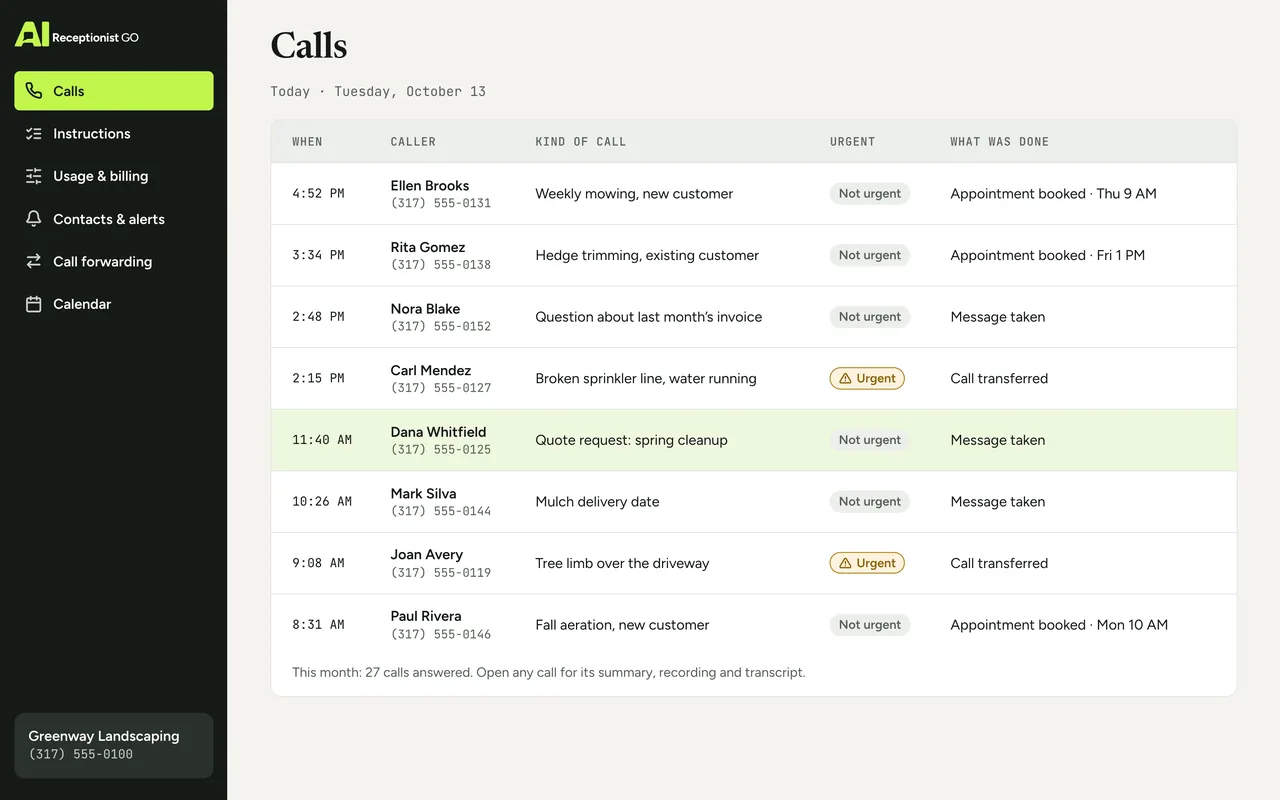
Time, caller, the kind of call and what happened: message taken, appointment booked, call transferred.
-
An AI call summary for each one
A few lines you can read in seconds: who, what they need, how urgent, what’s next.
-
The recording and the transcript
For the times you want the caller’s exact words.
-
What’s urgent and what you’ve used
Calls flagged as urgent stand out, and your calls this month are counted, next to the ones your plan includes if it has them.
How a call becomes a line in your dashboard
-
The call is answered and handled
Your AI receptionist answers with your business name, asks what your industry’s protocol says to ask, and then books, transfers or takes a message under your rules. Every call follows the same steps, so every line in your log has the same details.
-
The summary is written as the call ends
A short summary of the call is written from the conversation: the caller’s name and number, the reason for the call, its urgency and the outcome. The same summary goes to your inbox, so you don’t have to open the dashboard to know what happened.
-
Everything is kept together
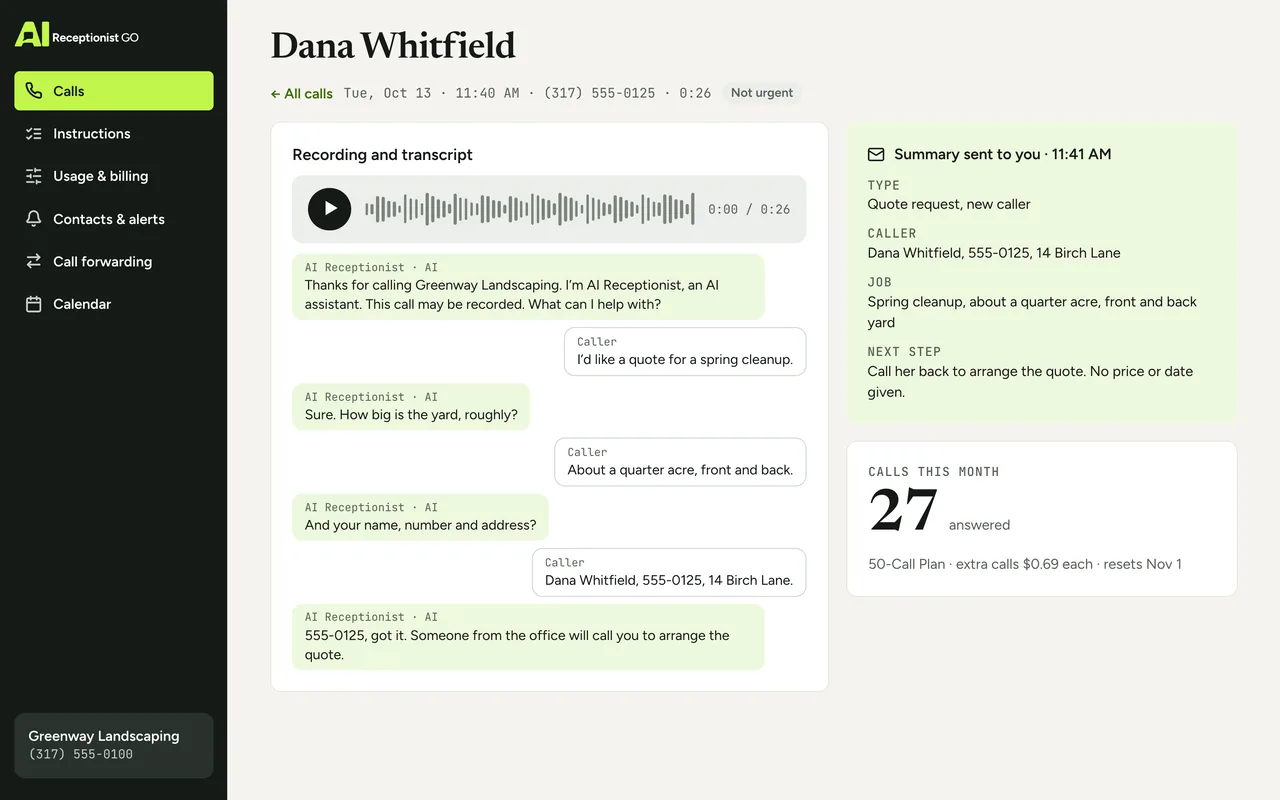
The summary, the recording and the transcript sit in one entry. You can look through your calls by date or by urgency, open any one, read it, or play it back. More on how calls are recorded and written down on call recording and transcription.
-
Your month adds up as you go
Each answered call is added to your monthly usage, and you can see the running total whenever you look.
Example call: a quote request for a landscaper
Greenway Landscaping
Message taken
- AI
- Thanks for calling Greenway Landscaping. I’m AI Receptionist, an AI assistant. This call may be recorded. What can I help with?
- Caller
- I’d like a quote for a spring cleanup.
- AI
- Sure. How big is the yard, roughly?
- Caller
- About a quarter acre, front and back.
- AI
- And your name, number and address?
- Caller
- Dana Whitfield, 555-0125, 14 Birch Lane.
- AI
- 555-0125, got it. Someone from the office will call you to arrange the quote.
Summary sent to you
- Type
- quote request, new caller.
- Caller
- Dana Whitfield, 555-0125, 14 Birch Lane.
- Job
- spring cleanup, about a quarter acre, front and back yard.
- Next step
- call her back to arrange the quote. No price or date given.
Every call logged and easy to review
Want yours logged this way? Get started.
What that call looks like in your dashboard
In your log, Dana’s call shows up as one line: the time it came in, her name, “quote request”, not urgent, message taken. Open it and you get the summary above, the recording you can play back and the full transcript. If her neighbor had called ten minutes later about a fallen tree on the driveway, that call would sit in the same list marked urgent, and the person you chose would already have been alerted.
Want to see your own calls this way? Get started, or browse the sample calls on our AI receptionist demo page.
Call log
Greenway Landscaping (example)
-
11:50 AM Fallen tree on the driveway Urgent
Alerted: the person you chose
-
11:40 AM Dana Whitfield · 555-0125 Message taken
Quote request: spring cleanup
About a quarter acre · 14 Birch Lane · call her back to arrange the quote
Recording 0:25 · Transcript
Urgent: 1 · Messages taken: 1
What you choose to see and receive
You decide how the information reaches you, and we configure it to match.
-
Who gets the summaries. You, your office manager, or both.
-
Which calls count as urgent, so they stand out in your log.
-
Who is alerted, and how. By email, or by having the call passed to them.
-
What the summary covers for your kind of business: job type, address, preferred day.
The method behind each summary
Our call protocols come from nearly two decades of running phone reception for small businesses.
A summary is only as good as the questions behind it: the dashboard only shows what the call asked for. Two rules shape every entry:
-
It asks what matters. Your industry’s protocol decides which details a summary can’t miss, so the number to ring back and why they called never go missing.
-
You see every call. A summary in your inbox, with the recording and transcript in your dashboard, for every call, including the short ones.
Read the full approach on our method.
Your protocol · Landscaping
ApprovedOn the call above · Greenway Landscaping (example)
-
It asks what matters
On this call: Asked: how big is the yard?
-
It knows when to hand over
-
It never promises what you don’t
-
It escalates real emergencies
-
You see every call
On this call: One line in your dashboard, recording behind it
Your dashboard compared with a voicemail inbox and a phone bill
Most owners already have two places to check calls. Here’s what each one tells you.
-
What you learn
Voicemail inbox: Whatever the caller chose to say
Phone bill call log: A number, a time and a durationAIReceptionistGo dashboard
Who called, why, how urgent, what was done
-
Calls with no message
Voicemail inbox: Lost
Phone bill call log: A number you don’t recognizeAIReceptionistGo dashboard
Answered, summarized and listed
-
Finding what matters
Voicemail inbox: Play each message in order
Phone bill call log: Guess from the numbersAIReceptionistGo dashboard
Urgent calls flagged
| Voicemail inbox | Phone bill call log | AIReceptionistGo dashboard | |
|---|---|---|---|
| What you learn | Whatever the caller chose to say | A number, a time and a duration | Who called, why, how urgent, what was done |
| Calls with no message | Lost | A number you don’t recognize | Answered, summarized and listed |
| Finding what matters | Play each message in order | Guess from the numbers | Urgent calls flagged |
| Exact words | The message, if they left one | None | Recording and transcript of the whole call |
| What it costs you to check | Time listening | Time guessing | A few lines to read |
If you’ve had a press-1 menu, IVR analytics tell you which key a caller pressed. Here you see what the caller actually said.
What the dashboard costs
The dashboard is part of every plan, never an add-on, including Pay As You Go, which has no monthly fee. Take the 50-Call Plan: 50 calls for $29, with the dashboard counting down what’s left. Any call beyond those costs $0.69, and you watch that number grow in the dashboard, not on the bill. Compare all plans on pricing.
Free setup · No contract · Cancel anytime
Your month, by plan
Best fit: 50-Call Plan, $29.00
- Pay As You Go Best fit $29.70
- 50-Call Plan Best fit $29.00
- 100-Call Plan Best fit $49.00
What the month would cost on each plan: the monthly fee plus each call past the ones included.
Questions about call analytics and summaries
What is an AI phone call summary?
An AI phone call summary is a short written account of a call, produced from the conversation itself. With AIReceptionistGo, it gives the caller’s name and number, what they wanted, whether it was urgent and what was done, such as a booked appointment or a message. It lands in your inbox and in your dashboard, next to the recording.
Do I have to log in every day?
No. Every summary is also sent to your inbox, so you can follow your calls from email. The dashboard is there when you want more: the full list, the recording, the transcript or your usage for the month. You can read summaries as they arrive and open the dashboard once a week.
Is there an answering service app?
You don’t need one to keep up with calls, and there’s nothing extra to install. Summaries arrive by email, which you already check on your phone, and urgent calls reach the person you picked by email or as a transferred call. The dashboard holds the full history, which is all a business answering service app would add, for when you sit down to go through it.
Can I hear exactly what the caller said?
Yes. Each call has its recording and a full transcript next to the summary. Callers hear a recording notice at the start of the call. To learn how recording works and what to know about consent, see call recording and transcription.
Will I know how many calls I’ve used this month?
Yes. Your dashboard keeps a running count of the calls answered this month. On a plan with calls included, you see how many are left; on Pay As You Go, you see the count so far. Either way, a busy month shows up before the invoice does. Plans and the price of each extra call are on the pricing page.
How is a summary different from a voicemail message?
A voicemail is whatever the caller decided to say, and many hang up without leaving one. A summary comes from a conversation where your protocol asked for what you need, so the name, number and reason are always there. For how messages are taken and delivered, see the message taking service.
See every call, without calling anyone back
Tell us who should read your summaries, what counts as urgent and which details matter in your line of work. We draft your protocol from what we know about calls like yours, you approve it, and your log starts filling in from the first forwarded call. The full process is on how it works.