
Feature
AI lead qualification: every new caller arrives with what you need to close
A 100% AI receptionist asks each new caller what they need, how soon, where and, if you want, their budget, then emails you a summary. A 100% AI receptionist asks new callers what they need, how soon and where. You get a summary.
Free setup · No contract · Cancel anytime
Short answer
AI lead qualification means every potential customer who calls is asked the right questions before the call ends, so you get a complete picture instead of a name and a number. With AIReceptionistGo, a 100% AI receptionist does this work and tells callers it’s an AI. It finds out what the caller needs, how soon, where and, when it matters, the budget, then sends you a short summary. You call back the right people first, already knowing what to say.
What it captures from a new caller
A missed lead rarely looks like a lost sale. It looks like a voicemail that says “Hi, call me back”, from someone who has already called two other businesses. Here’s what the AI collects instead, on the first call:
What they need. The job, the case or the service, in the caller’s words, then sorted into the categories you work with.
How soon. Today, this week or “just getting prices”. Timing tells you who to call first.
Where. The address or area, so you know straight away if it’s inside the zone you serve.
Budget, if it applies. Only when you want it asked, and only in the way you’d ask it.
Whether it fits. Give us your criteria (area, type of work, minimum job) and the protocol has the AI note in the summary whether the call meets them.
Callers who aren’t potential customers, like suppliers, vendors and robocalls, never reach your lead list. How that filtering works is on call screening.
New lead · Thu 9:12 AM
Harbor Roofing & Gutters
- What they need
- Gutter replacement, front and back of the house Gutters
- How soon
- This week, before the next rain Call first
- Where
- 41 Birch Road, Fairview In your area
- Budget
- Not asked: switched off in your settings.
- Fits
- Your area, your type of work, over your $250 minimum job Good fit
How answering service lead qualification works on the call
-
It asks your questions, in your order
An intake call service lives or dies by its questions, and every industry has its own. A roofer needs the address, the problem and whether it’s leaking now. A law firm needs the type of case and any deadline. The protocol starts from what we know about your industry, and you shape it until it’s the intake you’d do yourself.
Details you get
Web form only: The form’s fields
Callback list from voicemail: Whatever they said in the message
AIReceptionistGo: Your intake questions, answered -
It knows which questions can’t be skipped
Some details are must-haves: a callback number, the address for an on-site job, the date that makes a case urgent. The AI keeps the conversation going until it has them, without turning the call into a form. Callers who want to talk get to talk. The questions fit around what they say.
Follow-up questions
Web form only: None until you reply
Callback list from voicemail: You ask when you call back
AIReceptionistGo: Asked during the call -
It hands over the calls you want live
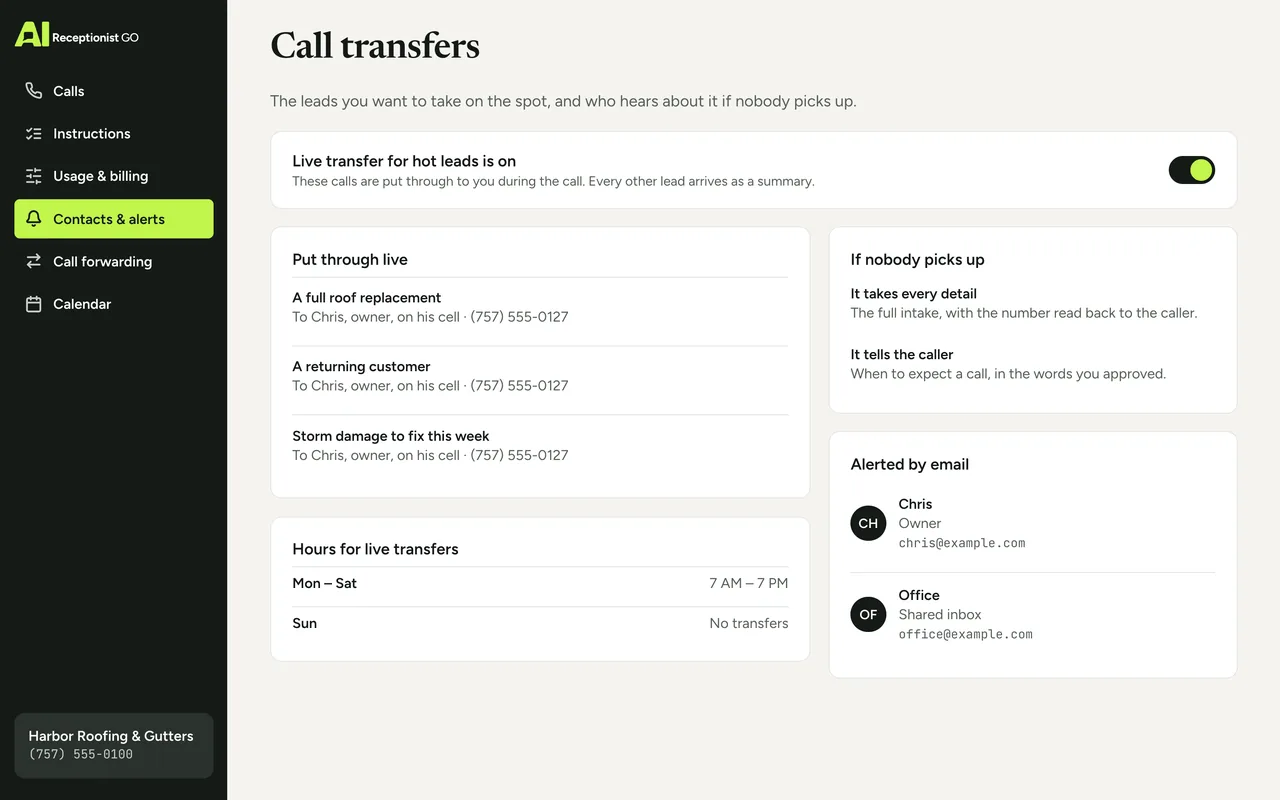
Some leads shouldn’t wait for a callback. You set which ones get transferred to you or your team on the spot: a large job, a returning customer, a case with a deadline this week. If nobody picks up, the AI takes the full details, tells the caller when to expect a call and alerts you by email. Read more about call transfer.
Hot leads
Web form only: Wait in the inbox
Callback list from voicemail: Wait for your callback
AIReceptionistGo: Transferred live if your rules say so -
You get the lead, ready to work
Each call arrives as a short summary in your inbox, with the recording and the transcript one click away. Every call is also logged in your call dashboard, so you can see the week’s new callers in one list and decide who to call first. To see the full process, from forwarding your line to the first summary, read how it works.
What you receive
Web form only: A form entry
Callback list from voicemail: Audio messages
AIReceptionistGo: Summary, recording and transcript
Example call: a roof leak and a quote request
Example call (about 30 seconds) with a made-up roofing company and caller.
Harbor Roofing & Gutters
New lead
- AI
- Harbor Roofing & Gutters. I’m AI Receptionist, the team’s AI assistant. What can I help with?
- Caller
- My roof’s leaking over the garage. I need a quote.
- AI
- Is water coming in right now?
- Caller
- Only when it rains.
- AI
- What’s the address, and when would you like someone to look at it?
- Caller
- 88 Linden Avenue. Before the weekend.
- AI
- A name and number to reach you?
- Caller
- Tom Becker, 555-0156.
- AI
- Thanks, Tom. The team will call to schedule the inspection.
Summary sent to you
- New lead
- roof leak over the garage, wants a quote.
- Caller
- Tom Becker, 555-0156, 88 Linden Avenue.
- Timing
- inspection before the weekend. Leaks only when it rains.
- Fit
- inside your service area; matches your repair criteria.
- Done
- told him the team will call to schedule. No price given.
Leads arrive with the details you need
Want every quote request to land like that one? Get started and we’ll draft your intake questions at no cost. More intake calls are on the AI receptionist demo.
What you decide about your leads
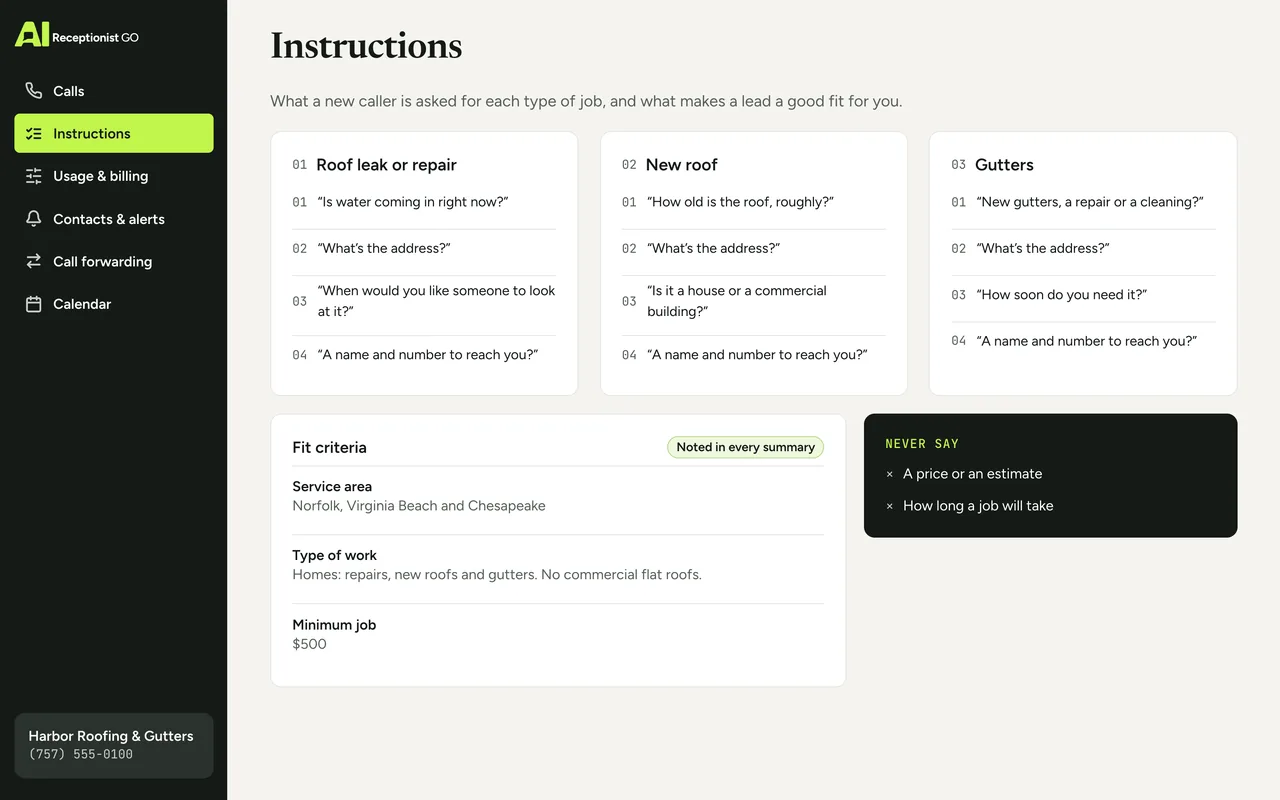
You know what a good customer looks like for your business. You decide what that is; we set up the rules the way you want them.
-
The intake questions. What to ask for each type of job or case, and in what order.
-
Your must-haves. The details a call can’t end without.
-
What makes a good fit. Service area, type of work, minimum job size or budget, if you use one.
-
Who gets which leads live. Which calls go straight to you, which to your team, and which wait for a callback.
-
What it never says. No prices, no estimates of how long a job takes, no promises you haven’t approved.
The method behind each intake
Our call protocols come from nearly two decades of running phone reception for small businesses. One lesson matters most with leads: the second call is the expensive one. If the first call doesn’t capture what you need, you lose time chasing details, and the caller may not pick up. Two rules carry most of the weight here:
-
It asks what matters. The basics first; then the details your industry can’t do without.
-
It knows when to hand over. The leads you want to take live go straight to you; the rest arrive complete.
See how protocols are written on our method.
Your protocol · Roofing
ApprovedOn the call above · Harbor Roofing & Gutters (example)
-
It asks what matters
On this call: Asked: is water coming in right now?
-
It knows when to hand over
On this call: Not a live transfer → lead arrives complete for your callback
-
It never promises what you don’t
-
It escalates real emergencies
-
You see every call
Lead capture compared: web forms, callback lists and AI
If you’re looking at a lead capture answering service or a lead call answering service, you’re probably comparing it with what you have now: a contact form on your website, or a list of callbacks from voicemail.
| Web form only | Callback list from voicemail | AIReceptionistGo | |
|---|---|---|---|
| Caller who’d rather phone | Has to go online | Leaves a message, if they wait for the beep | Is answered and asked your questions |
| Details you get | The form’s fields | Whatever they said in the message | Your intake questions, answered |
| Follow-up questions | None until you reply | You ask when you call back | Asked during the call |
| Hot leads | Wait in the inbox | Wait for your callback | Transferred live if your rules say so |
| What you receive | A form entry | Audio messages | Summary, recording and transcript |
Keep your web form. The AI makes sure the people who call get the same care.
What qualifying your leads costs
Lead intake is part of how every call is answered, on every plan. A business that gets about 30 calls a month in total pays $29 on the 50-Call Plan, which covers 50 calls; every call beyond those is billed at $0.69. With fewer calls, Pay As You Go has no monthly fee. Compare them on pricing.
Free setup · No contract · Cancel anytime
Your month, by plan
Best fit: 50-Call Plan, $29.00
- Pay As You Go Best fit $29.70
- 50-Call Plan Best fit $29.00
- 100-Call Plan Best fit $49.00
What the month would cost on each plan: the monthly fee plus each call past the ones included.
Questions about AI lead qualification
What is AI lead qualification?
It’s an AI that answers calls from potential customers and asks the questions that tell you whether they’re a good fit. AIReceptionistGo does this on every call, using an intake protocol for your industry, then sends you a written summary so the best leads get your first callbacks.
Will asking about budget put callers off?
Only if it’s asked badly. Budget is optional: you decide whether it’s asked, for which jobs, and in what words. Many owners prefer a softer question, like whether the caller already has a quote. The AI never pushes. If the caller doesn’t want to say, it moves on and notes that in your summary.
Does it work as a client intake answering service for law firms?
Yes. A legal intake asks for the type of matter, the people involved and any deadline or court date, and it flags urgent ones by your rules. The AI never gives legal advice and never tells a caller whether they have a case. It collects the facts so your team can decide.
Does it give leads a score, like an answering service with lead scoring?
Not a number. Instead of a score, the AI notes in your summary whether the call matches the criteria you set, such as service area, type of work or budget, and why. That’s usually more useful than a number, because you see the reason at a glance. Your criteria can be as simple or detailed as you like.
Does it call my leads back?
No. It answers the calls that come in to your business and captures the lead on that first call. The callback is yours to make, and your summary tells you who to call first and what they need. Leads you’d rather not wait on can be transferred to you live.
Where do the leads go after the call?
Each one arrives as a summary in your inbox and sits in your dashboard with every other call, with the recording and the transcript. From there you can copy the details into the tools you already use. Nothing is lost if you’re on a job when the call comes in.
Every new caller, ready for your callback
Related: appointment scheduling if you also want the caller booked into your calendar, and AI receptionist for small business for what it costs next to hiring help.
Describe how you qualify a customer today: the questions you ask, the jobs you want, the area you cover and which calls you’d drop everything for. We build your intake protocol on top of what we already know about your trade. It only goes live once you’ve signed off.